In case you missed the announcement: The Alteryx One Fall Release is here! Learn more about the new features and capabilities here
ACT NOW: The Alteryx team will be retiring support for Community account recovery and Community email-change requests after December 31, 2025. Make sure to check your account preferences in my.alteryx.com to make sure you have filled out your security questions. Learn more here
Start Free Trial

Alteryx Designer Desktop Discussions

Find answers, ask questions, and share expertise about Alteryx Designer Desktop and Intelligence Suite.
SOLVED

How to highlight a specific column

binsell
8 - Asteroid

I'm trying to highlight a specific column (SCSFEE) in green and when I output it to excel, it will show this column as green. I have used the 'Basic 'Table' tool but when I output my file, all my data is gone. I'm completely new to Alteryx and had little training so using the community to guide me through (which is brilliant btw!) Example attached of what I'm trying to achieve. Thank you in advance!


1 REPLY 1
cjaneczko
13 - Pulsar

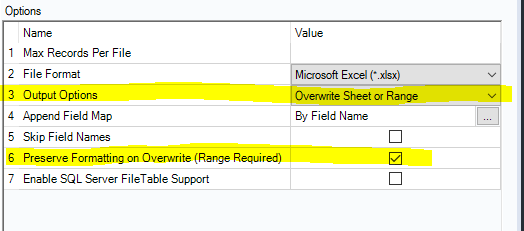
Easiest way is to highlight the column in Excel and save the file. On the output tool in Alteryx, check the Preserve Formatting check box. That way anytime you output to excel, that column will always be green. If your columns are dynamic, setup a Conditional Format in Excel to look for the (SCSFEE) column, and only highlight the data in the column with that name.


image.png

Labels
Top Solution Authors