In case you missed the announcement: The Alteryx One Fall Release is here! Learn more about the new features and capabilities here
ACT NOW: The Alteryx team will be retiring support for Community account recovery and Community email-change requests after December 31, 2025. Set up your security questions now so you can recover your account anytime, just log out and back in to get started. Learn more here
Start Free Trial

Alteryx Designer Desktop Discussions

Find answers, ask questions, and share expertise about Alteryx Designer Desktop and Intelligence Suite.
SOLVED

How to get the value of the last Row based on a Condition

MostafaBouzari
8 - Asteroid

Hi Everyone,

I'm hoping everyone is Feeling good in this Time.

i have a customer number Column that sometimes does not exist so it's null.

but the Customer Name thank Sort tool is available Like the excel File that i Have attached.

Want to get the Customer Number based on the Costomer Name

So i'm using a multirow tool and my condition is the following 


IF IsNull([Customer Nr.]) && Contains([Company name],[Row-1:Company name] ) 
THEN [Row-1:Customer Nr.] 
ELSE [Customer Nr.] 
ENDIF


But it's not giving me what i was looking for.

How can i achieve this?


Best Regards

Mostafa 

1 REPLY 1
ydmuley
12 - Quasar
12 - Quasar

Hello @MostafaBouzari 


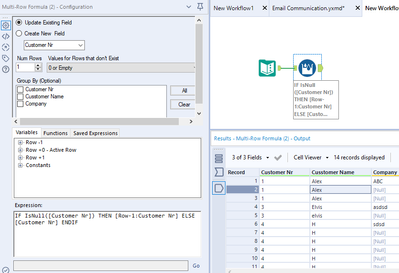
How about you trying to update the formula to look something similar to this?


You can add additional conditions if you would like to.


ydmuley_0-1585314999837.png


Regards,
Yugandhar Muley (Yug)

Alteryx ACE | Alteryx For Good India Lead | Bengaluru Alteryx User Group Lead
Labels
Top Solution Authors