In case you missed the announcement: The Alteryx One Fall Release is here! Learn more about the new features and capabilities here
ACT NOW: The Alteryx team will be retiring support for Community account recovery and Community email-change requests after December 31, 2025. Set up your security questions now so you can recover your account anytime, just log out and back in to get started. Learn more here
Start Free Trial

Alteryx Designer Desktop Discussions

Find answers, ask questions, and share expertise about Alteryx Designer Desktop and Intelligence Suite.
SOLVED

How to do two inputs for Batch Macro

zoeuno
7 - Meteor

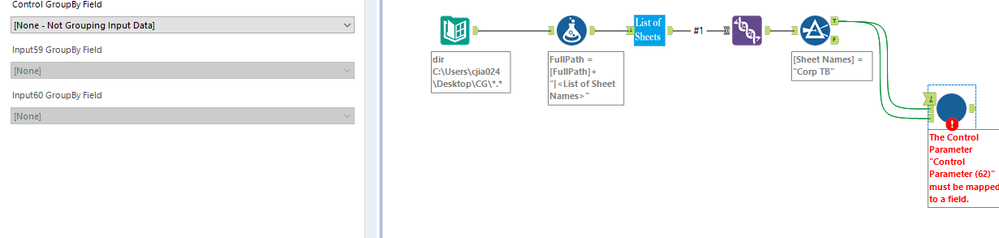
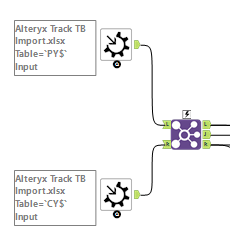
Hi Everyone! I've been using Alteryx for a while but still pretty new to macros. I've created a workflow that I'd like to package to a macro and take two inputs. The two inputs will be two sheets in the main workflow but I don't know how to structure it within the macro workflow for it to do that. Currently I have the input set up like this and the main workflow shows "Error: Track TB Import (9): The Control Parameter "Control Parameter (62)" must be mapped to a field.". If I add a control parameter in the macro workflow, it doesn't allow me to link to the macro input and I don't know where else to link it. Can someone help me?


Capture.PNGCapture2.PNG

1 REPLY 1
GrahamL
8 - Asteroid

Hi there


The control parameter input is mandatory is you have one in your macro. But Control Parameters are not required for every type of macro so it depends on what your use case is. Are you able to confirm what you are attempting to put into the macro and/or post an example of the expected output?


Cheers


G

Labels
Top Solution Authors