ACT NOW: The Alteryx team will be retiring support for Community account recovery and Community email-change requests Early 2026. Make sure to check your account preferences in my.alteryx.com to make sure you have filled out your security questions. Learn more here
Start Free Trial

Alteryx Designer Desktop Discussions

Find answers, ask questions, and share expertise about Alteryx Designer Desktop and Intelligence Suite.
RÉSOLU

How to combine values in columns with AND

wonka1234
Boule de feu

Hi,


I have 4 filter logic formulas. And now I want to combine them into a new column to say "this AND this"


Expected Output would be


If more then 2 results exist in a row, then use AND in a new column. Ie   "Met Action Plan AND Met Current Resoultion"  but if row is blank leave blank , or if row contains 1 value leave the one value.


Thanks.


5 RÉPONSES 5
rzdodson
Quasar

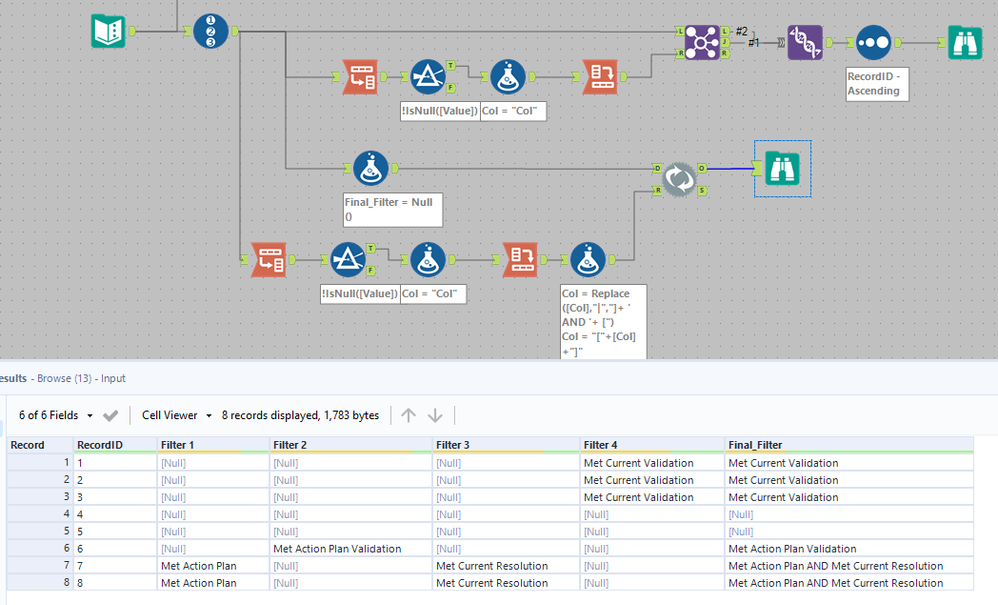
@wonka1234 here is one way to do it with an iterative macro approach.


Solution.png

Prometheus
Quasar

@wonka1234 For this use case you can use a Summarize tool instead of a Formula tool. Select the fields you want to affect (in this case, all of them), then click on Add to get the drop down menu. From there, hover over String and you'll see Concatenate. Click on that. At the bottom of the Configuration Window, you'll see Concatenate Properties. Change the comma to " AND " without the quotes. Just make sure you have the space before AND and the space after it.

Concatenate all fields.PNG

wonka1234
Boule de feu

@Prometheus  but need to join it back to the other records! need the fulll output

SPetrie
Pulsar

If you use the suggestion by @Prometheus  you can use a record ID, join, and union tool to get back to the original full data set with the new column.

You can also use a similar approach with a dynamic find and replace if you dont want a join/union.


combine.PNG

CoG
Magnétar

Here is a hideous, but effective formula that I believe accomplishes what you requested!

Replace(
 Replace( 
  Replace(
   Trim([Filter 1] + "," + [Filter 2] + "," + [Filter 3] + "," + [Filter 4],","),
   ",,,",
   " AND "
  ),
  ",,",
  " AND "
 ),
 ",",
 " AND "
)

I think the macro would be the best way to go, but if you really want a formula. This should work for the problem you specified.

Étiquettes
Auteurs des meilleures solutions