Hi Community,
I've been doing an exercise and I couldn't figure out how to combine all row values from different columns into one.
Example:
How do I get this output?
Apple Orange
12 1
34 2
23 3
12
Thank you everyone.
Hi @samxhander09
I would try something like this...
hi @samxhander09
When handling "horizontal" shape data like this, using transpose/cross-tab is the best.
Please reference to the attached workflow.
In this case both the workflows work fine but i suggest to go with @PhilipMannering as the workflow is dynamic and will work if any additional fruit is added
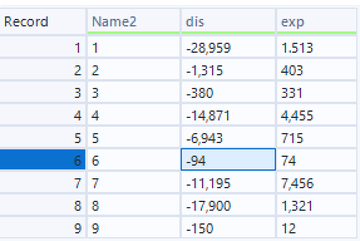
I'm attaching a sample input, I couldn't seem to make it work.
I wanted to output like this:
Exp Dis
1513 (28,959)
403 (1315)
Combine all Exps values into one column same with Dis. Appreciate all the help so far.
Hi, I couldn't seem to make it work. I wanted to output it this way:
1513 28959
403 1315
Just basically have two columns with all the values in order from 1-9. I have attached the sample input for reference.
Thank you.
Hi, I couldn't seem to make it work. What I wanted to output is two columns for Exp and Dis with the corresponding row values in order from 1-9.
I'm attaching an input sample for reference, appreciate the help.
@samxhander09
Do you expect the output to look something like this?
Hi, yes. This is how I want them to output.
@PhilipMannering
Hi, yes, this is how I want my output to look like.
Then just replace the Text Input Tool (in my workflow) with the Excel file that you shared. After that, Sort Tool and Select Tool will do the rest.
I actually can't replace it with excel, since the input is coming from a different data stream. If the input looks like that, is there other way to achieve my desired output other than converting my input to excel?
Can you then connect the different data stream to my workflow pasted into yours (with the Text Input Tool removed)?