In case you missed the announcement: The Alteryx One Fall Release is here! Learn more about the new features and capabilities here
ACT NOW: The Alteryx team will be retiring support for Community account recovery and Community email-change requests Early 2026. Make sure to check your account preferences in my.alteryx.com to make sure you have filled out your security questions. Learn more here
Start Free Trial

Alteryx Designer Desktop Discussions

Find answers, ask questions, and share expertise about Alteryx Designer Desktop and Intelligence Suite.
SOLVED

Filtering data using Filter tool based on multiple criteria from a column

Vasyl11
6 - Meteoroid

Hello,

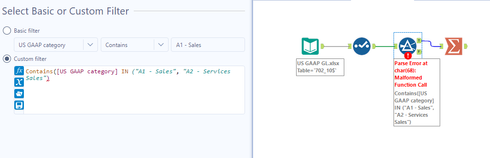
When I try to filter "A1 - Sales", "A2 - Services Sales" in filter tool, I get error. See sceen. Could anyone help? Thanks

Vasyl11_0-1616423726674.png


3 REPLIES 3
Emil_Kos
17 - Castor
17 - Castor

Hi @Vasyl11,


To make in statement work you just need the name of the field + the list of items. 


Try removing contains and it should work for you. 

Vasyl11
6 - Meteoroid

Thanks a lot!

Sntrada
11 - Bolide

If you are trying to evaluate if the US GAAP Category column contains "A1 - Sales" or "A2 - Services Sales", then your formula should be like this:


Contains ([US GAAP Category], "A1 - Sales")

OR

Contains ([US GAAP Category], "A2 - Services Sales")


If this is not what you are trying to do, please explain what you are trying to filter. 
 

Labels
Top Solution Authors