In case you missed the announcement: The Alteryx One Fall Release is here! Learn more about the new features and capabilities here
ACT NOW: The Alteryx team will be retiring support for Community account recovery and Community email-change requests after December 31, 2025. Make sure to check your account preferences in my.alteryx.com to make sure you have filled out your security questions. Learn more here
Start Free Trial

Alteryx Designer Desktop Discussions

Find answers, ask questions, and share expertise about Alteryx Designer Desktop and Intelligence Suite.
SOLVED

FIND AND REPLACE

Lean_Sawko
7 - Meteor

Hi everyone,


I need your help, I have 2 different files with different rows and columns.

I create a new column to identify an ID. if this ID match in second file I want it to bring me the ID2, It's pretty similar to the =VLOOKUP(A1:A2, 2, 0) How you do this in the simplest possible way? 


Thanks,

 Leandro

1 REPLY 1
Qiu
21 - Polaris
21 - Polaris

@Lean_Sawko 
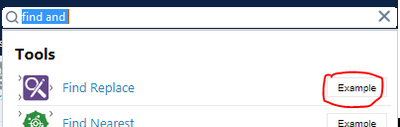
I can think of is Find and Replace.

Try to explore the sample first.


With some sample data, I can explain it better.

Qiu_0-1613691220749.png


Labels
Top Solution Authors