In case you missed the announcement: The Alteryx One Fall Release is here! Learn more about the new features and capabilities here
ACT NOW: The Alteryx team will be retiring support for Community account recovery and Community email-change requests after December 31, 2025. Set up your security questions now so you can recover your account anytime, just log out and back in to get started. Learn more here
Start Free Trial

Alteryx Designer Desktop Discussions

Find answers, ask questions, and share expertise about Alteryx Designer Desktop and Intelligence Suite.
SOLVED

Dynamic Rename Tool - Replacing all Special Characters with one formula

paultno
8 - Asteroid

Hello,


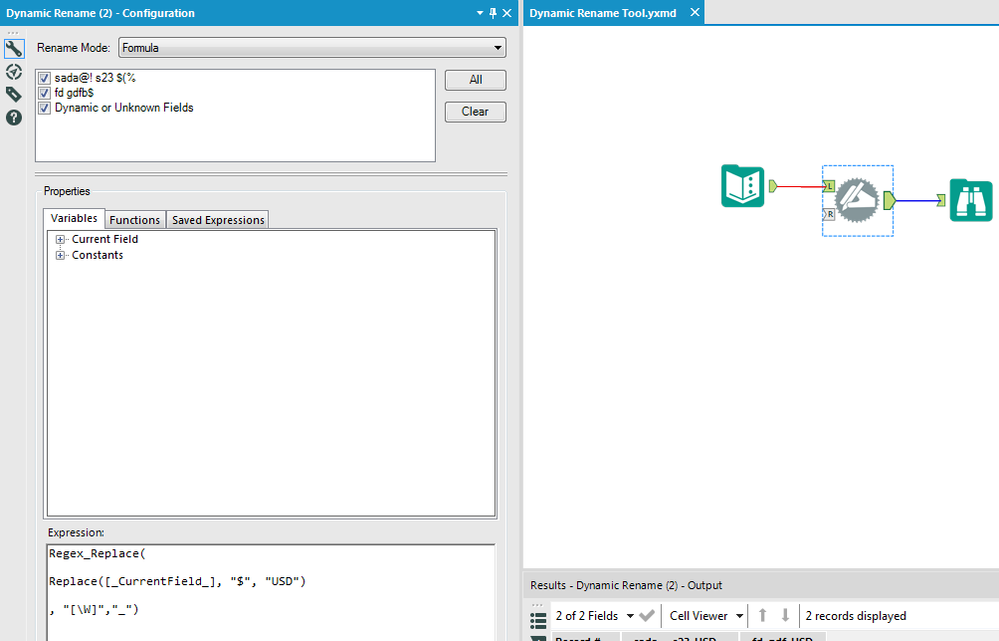
Is there a quick way to replace special characters with underscores or other letters?  For example, we want "$" to be "USD" and any spaces to be "_".  I am currently using REPLACE for each type of special character, each in its own Dynamic Rename Tool back to back to back!


Thanks!

Paul

1 REPLY 1
jasperlch
12 - Quasar

Hi, you could use a Regex_Replace function in the Formula inside the Dynamic Rename tool, where \W inside the square bracket means any non-Word Character. If there are any other characters you would like to be replace by "_", you can put them inside the square bracket. For example [\Wb] will replace any non-word character and  the character 'b' by '_':


Capture1.PNG

Labels
Top Solution Authors