ACT NOW: The Alteryx team will be retiring support for Community account recovery and Community email-change requests Early 2026. Make sure to check your account preferences in my.alteryx.com to make sure you have filled out your security questions. Learn more here
Start Free Trial

Alteryx Designer Desktop Discussions

Find answers, ask questions, and share expertise about Alteryx Designer Desktop and Intelligence Suite.
RESUELTAS

DateTimeDiff() on minutes doesn't work as intended

kelvenlim
Meteoro

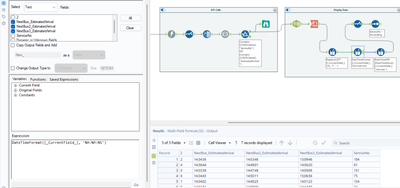
al2.png


The first image shows the times in 24h and string format.
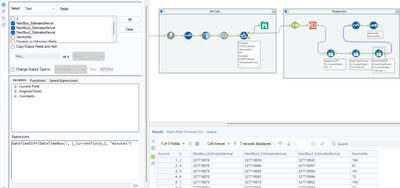
 

al3.png

The second image shows me using datetimediff() on the current date and the field, and giving me the minutes. But after executing, it gives me a super big number. Does anyone know what's wrong?


Thank you.

6 RESPUESTAS 6
ShankerV
Cástor

Hi @kelvenlim 


Both the images are same.

So could see the time used. Please can you help on the time used in first screenshot.


Many thanks

Shanker V

kelvenlim
Meteoro

@ShankerV I edited the post. Are both images okay now?

ShankerV
Cástor

Hi @kelvenlim 


Please find the expected output.


ShankerV_0-1675666591301.png


Many thanks

Shanker V

ShankerV
Cástor

Hi @kelvenlim 


As per the image I understand you remove the date and use only time.

Hence I am also getting the same random number in minutes,


Actually we need some date to get the right output.

Hence today's date is added to to get the desired output.


I have tried to achieve the result in one tool also as below.

ShankerV_0-1675666956419.png


Many thanks

Shanker V

kelvenlim
Meteoro

Thank you @ShankerV .


Turns our datetimetoday() and datetimenow() are different. I thought they would give the same result. The tables values are now showing what I expected.

ShankerV
Cástor

Hi @kelvenlim 


Datetimetoday() will give only today's date with time as 00:00:00

Datetimenow() will give today's date with current time too.


Many thanks

Shanker V

Etiquetas
Autores con mayor cantidad de soluciones