ACT NOW: The Alteryx team will be retiring support for Community account recovery and Community email-change requests Early 2026. Make sure to check your account preferences in my.alteryx.com to make sure you have filled out your security questions. Learn more here
Start Free Trial

Alteryx Designer Desktop Discussions

Find answers, ask questions, and share expertise about Alteryx Designer Desktop and Intelligence Suite.
SOLVED

Date/Time Parse

JeffJones
6 - Meteoroid

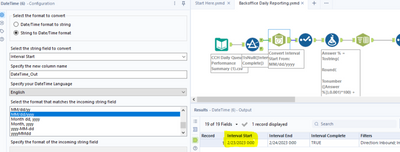
I have a date in the format of 2023-02-23.  I am having trouble getting it to convert to a format of 2/23/2023.


I performed a date/time function to get the data to 2023-02-23  as shown below but can get it to end up as 2/23/2023


JeffJones_0-1677299014905.png


1 REPLY 1
BrandonB
Alteryx
Alteryx

If you are starting with an actual date data type you can use DateTimeFormat([DateField], "%m/%d/%Y") to get it into your desired format in a formula tool. 


https://help.alteryx.com/20223/designer/datetime-functions use this link as a reference page for date type operators

Labels
Top Solution Authors