The Alteryx Community is a finalist in three 2026 CMX Awards! Help us win Customer Support Community, Most Engaged Community, and User Group Program of the Year - vote now! (it only takes about 2 minutes) before January 9.
ACT NOW: The Alteryx team will be retiring support for Community account recovery and Community email-change requests Early 2026. Make sure to check your account preferences in my.alteryx.com to make sure you have filled out your security questions. Learn more here
Start Free Trial

Alteryx Designer Desktop Discussions

Find answers, ask questions, and share expertise about Alteryx Designer Desktop and Intelligence Suite.
解決済み

Date Formatting

jlfromm
アステロイド

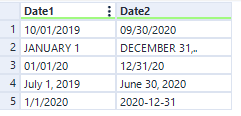
I am bringing in several files that have the start and end dates formatted all different. When I bring them into my file they are a V_string, if I change the type to Date then the file show Null for them and nothing is brought in for those columns.  What do I need to do to convert them all over to a date format?  Here is a example of how my dates are coming in because that is the way they are in the different files.   I want to  reformat to read MM/DD/YYYY.


jlfromm_0-1646328096548.png


1件の返信1
AngelosPachis
ネビュラ

Hi @jlfromm ,


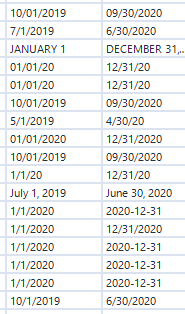
I believe you should find all the different date formats appearing in your columns and then write an If statement that captures all different scenarios. In the attached screenshot, these are the different scenarios I could identify


AngelosPachis_0-1646331601161.png


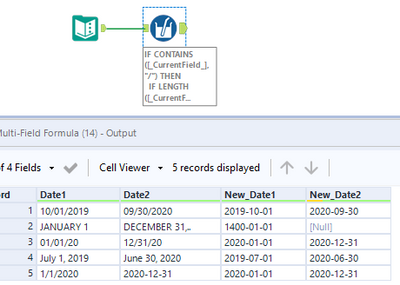
Because you want to apply a formula across multiple fields, you can use a multi-field formula (it will also allow you to change the data type without having to use an extra select tool at the end).


Then the painful part is writing the expression (have this page open when doing so)


IF CONTAINS([_CurrentField_],"/") THEN  // either 10/01/2019 or  01/01/20
     IF LENGTH([_CurrentField_])=10 THEN DATETIMEPARSE([_CurrentField_],"%m/%d/%Y")  // 10/01/2019 
     ELSEIF LENGTH([_CurrentField_])=8 THEN DATETIMEPARSE([_CurrentField_],"%m/%d/%y")  // 01/01/20
     ELSE NULL()
     ENDIF
ELSEIF CONTAINS([_CurrentField_],"-") THEN [_CurrentField_]  // 2020-12-31
ELSE
      IF REGEX_MATCH([_CurrentField_],"\u{2,}")  // string has 2  or more uppercase letters appearing in a row, i.e. JANUARY 1

      THEN DATETIMEPARSE([_CurrentField_],"%b %d")
      ELSE DATETIMEPARSE([_CurrentField_],"%b %d, %Y") // July 1, 2019
      ENDIF
ENDIF


AngelosPachis_0-1646331934680.png


For DECEMBER 31,.. maybe you have to do a bit of cleaning before the multi-field formula so you don't get Null as a result.


Hope that helps,


Angelos

ラベル
トップのソリューション投稿者