Alteryx Designer Desktop Discussions
Find answers, ask questions, and share expertise about Alteryx Designer Desktop and Intelligence Suite.- Community
- :
- Community
- :
- Participate
- :
- Discussions
- :
- Designer Desktop
- :
- Cross Tab Tool - Losing Original Formatting in Col...
Cross Tab Tool - Losing Original Formatting in Column Header
- RSS-Feed abonnieren
- Thema als neu kennzeichnen
- Thema als gelesen kennzeichnen
- Diesen Thema für aktuellen Benutzer floaten
- Lesezeichen
- Abonnieren
- Stummschalten
- Drucker-Anzeigeseite

- Als neu kennzeichnen
- Lesezeichen
- Abonnieren
- Stummschalten
- RSS-Feed abonnieren
- Kennzeichnen
- Moderator informieren
Hi, I am working with a large time-series, when I am ready to flip my results after some calculations, from vertical to horizontal so time runs left to right, when I use the Cross Tab Tool, I lose original formatting in the Column Header.
So, when working prior to using the Cross Tab Tool, my time-series is running vertically so time runs top to bottom with a YYYY.Q format that I need for later in the output process to Excel and then charting with this format.
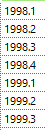
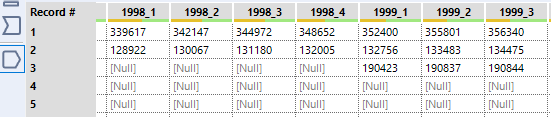
When I use the Cross Tab Tool and flip obtain the following in the Results...I lose the YYYY.Q formatting:
...and also, obviously, in the Excel output though an Output Tool:
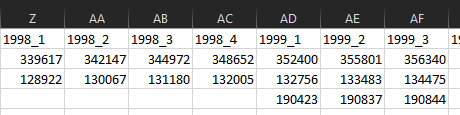
Not sure why this happens and I have played with the Type of YYYY.Q column in a Select Tool no avail. Am I missing something in a configuration setting?
Thanks for any insight/help!
Gelöst! Gehe zu Lösung.
- Beschriftungen:
-
Time Series


 Thableaus
- Als neu kennzeichnen
- Lesezeichen
- Abonnieren
- Stummschalten
- RSS-Feed abonnieren
- Kennzeichnen
- Moderator informieren
All non-word characters are transformed into underscores (_) when using Cross-Tab Tool.
This is a normal behavior.
A workaround would be using the Dynamic Rename Tool.
In your case, it should be very simple. Use Formula method.
ReplaceChar([_CurrentField_], "_", ".")
Cheers,
- Als neu kennzeichnen
- Lesezeichen
- Abonnieren
- Stummschalten
- RSS-Feed abonnieren
- Kennzeichnen
- Moderator informieren

-
Academy
6 -
ADAPT
2 -
Adobe
204 -
Advent of Code
3 -
Alias Manager
78 -
Alteryx Copilot
27 -
Alteryx Designer
7 -
Alteryx Editions
96 -
Alteryx Practice
20 -
Amazon S3
149 -
AMP Engine
252 -
Announcement
1 -
API
1.210 -
App Builder
116 -
Apps
1.360 -
Assets | Wealth Management
1 -
Basic Creator
15 -
Batch Macro
1.559 -
Behavior Analysis
246 -
Best Practices
2.696 -
Bug
720 -
Bugs & Issues
1 -
Calgary
67 -
CASS
53 -
Chained App
268 -
Common Use Cases
3.825 -
Community
26 -
Computer Vision
87 -
Connectors
1.426 -
Conversation Starter
3 -
COVID-19
1 -
Custom Formula Function
1 -
Custom Tools
1.939 -
Data
1 -
Data Challenge
10 -
Data Investigation
3.489 -
Data Science
3 -
Database Connection
2.221 -
Datasets
5.223 -
Date Time
3.229 -
Demographic Analysis
186 -
Designer Cloud
743 -
Developer
4.377 -
Developer Tools
3.534 -
Documentation
528 -
Download
1.038 -
Dynamic Processing
2.941 -
Email
929 -
Engine
145 -
Enterprise (Edition)
1 -
Error Message
2.262 -
Events
198 -
Expression
1.868 -
Financial Services
1 -
Full Creator
2 -
Fun
2 -
Fuzzy Match
714 -
Gallery
666 -
GenAI Tools
3 -
General
2 -
Google Analytics
155 -
Help
4.711 -
In Database
966 -
Input
4.297 -
Installation
361 -
Interface Tools
1.903 -
Iterative Macro
1.095 -
Join
1.960 -
Licensing
252 -
Location Optimizer
60 -
Machine Learning
260 -
Macros
2.866 -
Marketo
12 -
Marketplace
23 -
MongoDB
82 -
Off-Topic
5 -
Optimization
751 -
Output
5.260 -
Parse
2.328 -
Power BI
228 -
Predictive Analysis
937 -
Preparation
5.171 -
Prescriptive Analytics
206 -
Professional (Edition)
4 -
Publish
257 -
Python
855 -
Qlik
39 -
Question
1 -
Questions
2 -
R Tool
476 -
Regex
2.339 -
Reporting
2.434 -
Resource
1 -
Run Command
576 -
Salesforce
277 -
Scheduler
411 -
Search Feedback
3 -
Server
631 -
Settings
936 -
Setup & Configuration
3 -
Sharepoint
628 -
Spatial Analysis
599 -
Starter (Edition)
1 -
Tableau
512 -
Tax & Audit
1 -
Text Mining
468 -
Thursday Thought
4 -
Time Series
432 -
Tips and Tricks
4.188 -
Topic of Interest
1.126 -
Transformation
3.733 -
Twitter
23 -
Udacity
84 -
Updates
1 -
Viewer
3 -
Workflow
9.983
- « Vorherige
- Nächste »
| Benutzer | Anzahl |
|---|---|
| 11 | |
| 11 | |
| 4 | |
| 3 | |
| 2 |


