In case you missed the announcement: The Alteryx One Fall Release is here! Learn more about the new features and capabilities here
ACT NOW: The Alteryx team will be retiring support for Community account recovery and Community email-change requests after December 31, 2025. Set up your security questions now so you can recover your account anytime, just log out and back in to get started. Learn more here
Start Free Trial

Alteryx Designer Desktop Discussions

Find answers, ask questions, and share expertise about Alteryx Designer Desktop and Intelligence Suite.
SOLVED

Change from Militarty time to standard

Tessa_Gable
7 - Meteor

I am importing data from a table in SQL server.  The origins of this data in SQL server is Salesforce and is formatted as this: (Time)
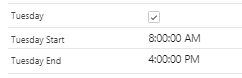
Tessa_Gable_1-1652292698640.png


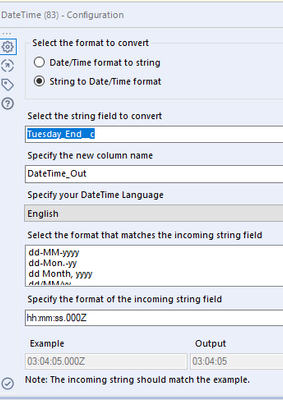
However, I tried the datetime tool I've also tried parse but can't get this into a normal standard time of 4:00.  
 

Tessa_Gable_0-1652292360447.png


I've tried the date time tool

Tessa_Gable_2-1652293041450.png


Any suggestions would be appreciated :-)

3 REPLIES 3
DataNath
17 - Castor
17 - Castor

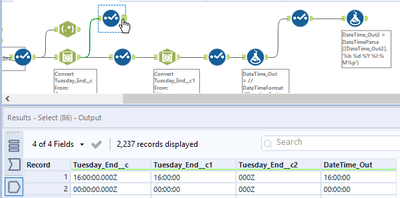
How do you get on with this? Have included both options; formula and DateTime tools.


DataNath_0-1652298725437.png


Tessa_Gable
7 - Meteor

The input tool is bringing the data in as 16:00:00.000Z.  These are store hours so I need the output to be 4:00.  I've not seen this format before, 16:00:00.000Z.

DataNath
17 - Castor
17 - Castor

Have updated the workflow. Does this work? If not let me know and let me know if it's fine to parse the incoming time to hh:mm first, too.


In terms of the format, Iirc, the 000Z is just an indicator as to how much the time needs to be offset against UTC. In this case it's 0.


DataNath_0-1652302111475.png


EDIT: If you want the time in 12 hour with/without the am/pm indicators then you can use the equations in this formula tool as you see fit.


DataNath_0-1652302451264.png


Labels
Top Solution Authors