In case you missed the announcement: The Alteryx One Fall Release is here! Learn more about the new features and capabilities here
ACT NOW: The Alteryx team will be retiring support for Community account recovery and Community email-change requests after December 31, 2025. Set up your security questions now so you can recover your account anytime, just log out and back in to get started. Learn more here
Start Free Trial

Alteryx Designer Desktop Discussions

Find answers, ask questions, and share expertise about Alteryx Designer Desktop and Intelligence Suite.

Avoid Warning Message when Input File Has Multiple Same Header Names

SurferJim
7 - Meteor

Hello, I can't seem to come up with  the right approach for my workflow.   Thanks for your help. :)


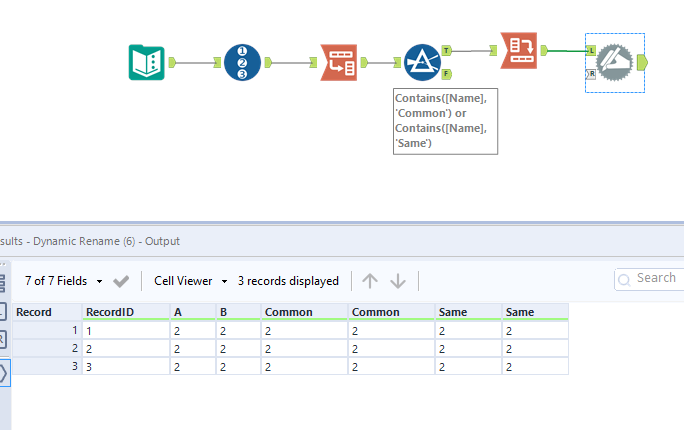
For input File 1 below,  I want to dynamically remove all other columns except "Common" and "Same".  I can come up with a hardcoded workflow by using the Dynamic Rename Tool while avoiding the warning about columns having same header name. However, for the next run, my new input file (File 2) may have a different number of "Common" and "Same" columns and other new column header names.  How do I set up a workflow to account for the variance?   I will always want the "Common" and "Same" column for every new run.  Also I want to avoid the warning message about multiple columns having the same name.


File 1:

ABCommonCommonDSameSame
2222222
2222222
222222

2


File 2:

FACommonCommonCommonNSame
3333333
3333333
1 REPLY 1
binu_acs
21 - Polaris

@SurferJim 


binuacs_1-1645721653453.png


Labels
Top Solution Authors