In case you missed the announcement: The Alteryx One Fall Release is here! Learn more about the new features and capabilities here
ACT NOW: The Alteryx team will be retiring support for Community account recovery and Community email-change requests after December 31, 2025. Set up your security questions now so you can recover your account anytime, just log out and back in to get started. Learn more here
Start Free Trial

Alteryx Designer Desktop Discussions

Find answers, ask questions, and share expertise about Alteryx Designer Desktop and Intelligence Suite.
SOLVED

Autosize without changing Data Type - Macro Description Help

Reggie1995
8 - Asteroid

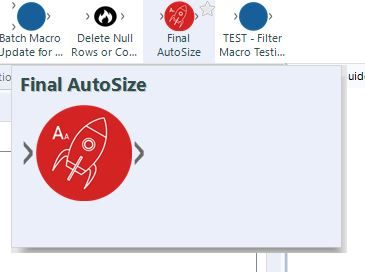
I have successfully created a version of the Autofield tool that only alters the size of your data, rather than the data type and size.  However, before I publish, I want to add a description so that when users utilize it and add to their tool ribbon they can see a description.  Can someone assist with this?

Capture.JPG

1 REPLY 1
Thableaus
17 - Castor
17 - Castor

Hi @Reggie1995 


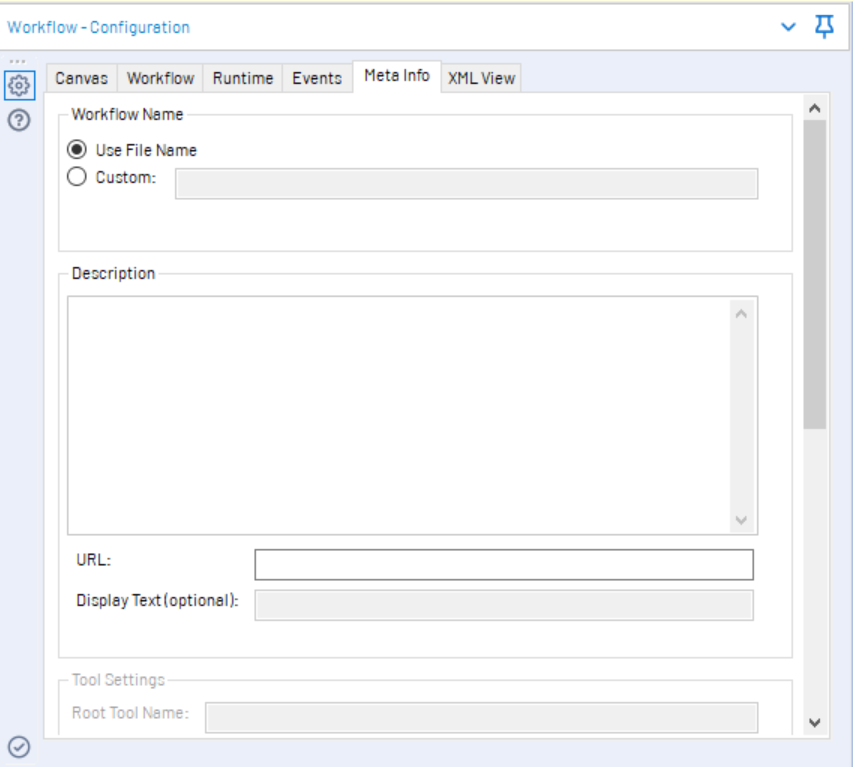
On the MetaInfo Tab, when you click on the canvas of your workflow (it will show up workflow configuration), you can set the description for the macro.

metaInfo.PNG


There's the field Description.


Cheers,

Labels
Top Solution Authors