In case you missed the announcement: The Alteryx One Fall Release is here! Learn more about the new features and capabilities here
ACT NOW: The Alteryx team will be retiring support for Community account recovery and Community email-change requests after December 31, 2025. Set up your security questions now so you can recover your account anytime, just log out and back in to get started. Learn more here
Start Free Trial

Alteryx Designer Desktop Discussions

Find answers, ask questions, and share expertise about Alteryx Designer Desktop and Intelligence Suite.
SOLVED

2 part question: Datetimeadd in formula and combine data from filters after forumula

lamor
6 - Meteoroid

Hi, 


This is a 2-part question. If you have a better solution to remove the T/F filter mentioned below, please let me know! 


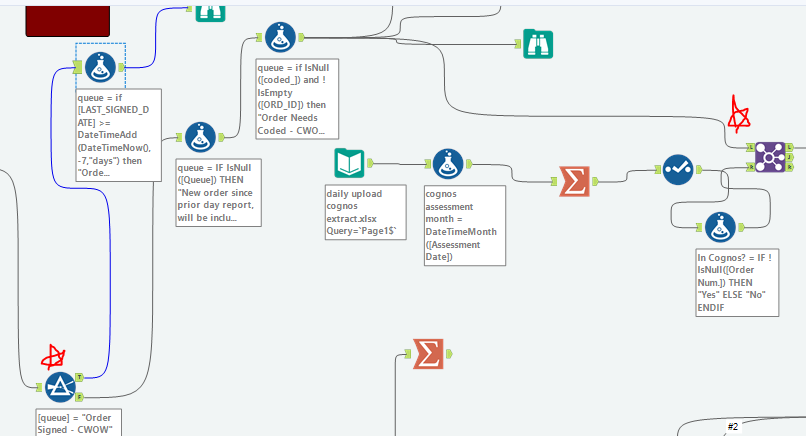
The queue column is based on multiple formulas but I need anything that says "order signed" to go through a 2nd set of formulas then enter those results back into the queue column.  My idea was to use a T/F filter for the "Order signed" category, if they fall into the T filter then apply to formulas below (picture 1). Then combine these results back into the original set of data.


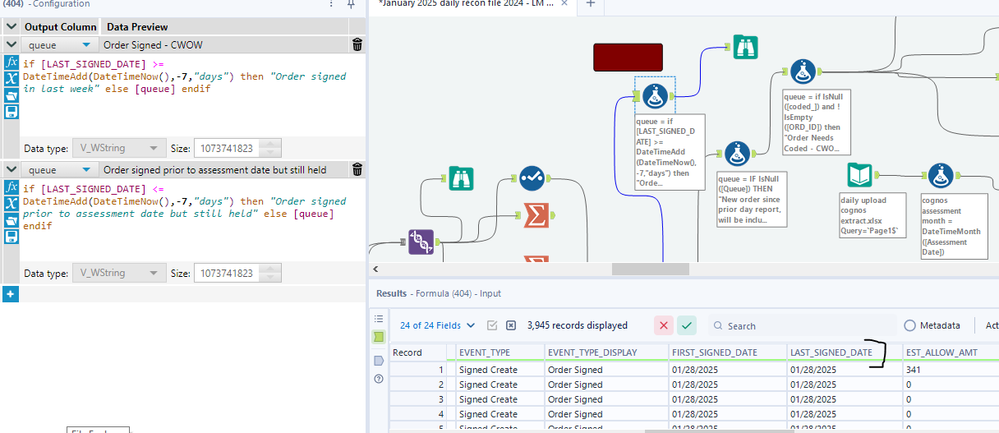
Question 1: Why is the datetimeadd formula not working? I know the signed date is within the last 7 days. 


Question 2: How do I bring this data back into the data set? I need the results to go back into the join tool where the red star is. 
 

formula orders signed.PNGworkflow.PNG

3 REPLIES 3
zkibz16
7 - Meteor

Hi,


For your first question, I would check that your [LAST_SIGNED_DATE] is in a DateTime format. It appears in your results window as "MM/DD/YYYY" format and not the standard "YYYY-MM-DD" date format. Hopefully that will at least help solve your DateTimeAdd formula issues!

apathetichell
20 - Arcturus

@zkibz16is correct - these be strings. you need to use a datetime tool (or datetimeparse([yourfield[,"%m/%d/%Y") to convert them into dates. that should fix that. you can use a union tool to join two datastreams but the common way to do this is with a conditional statement in a formula and then modifying the field based upon that condition vs splititng, formula/union.

lamor
6 - Meteoroid

This worked! Thank you! 

Labels
Top Solution Authors