Upgrading your Alteryx Server environment often means performing a sequence of delicate steps—one misconfiguration, missed backup, or delayed manual hand-off can derail the entire process. That’s why our team developed a new automated script to automate the Server host recovery process that may be required during an Alteryx Server upgrade.
The result? Significantly less time lost, fewer manual errors, and an overall smoother upgrade experience.
Let's See it in Action
The new Host Recovery Automation script can be used to perform a backup of your existing Server and embedded MongoDB instances, and subsequently can be used to recover the Server with your original users, workflows, and schedules restored. This is an important step for Server upgrades that require migrating environments or recovering your Server instance during a disaster recovery scenario.
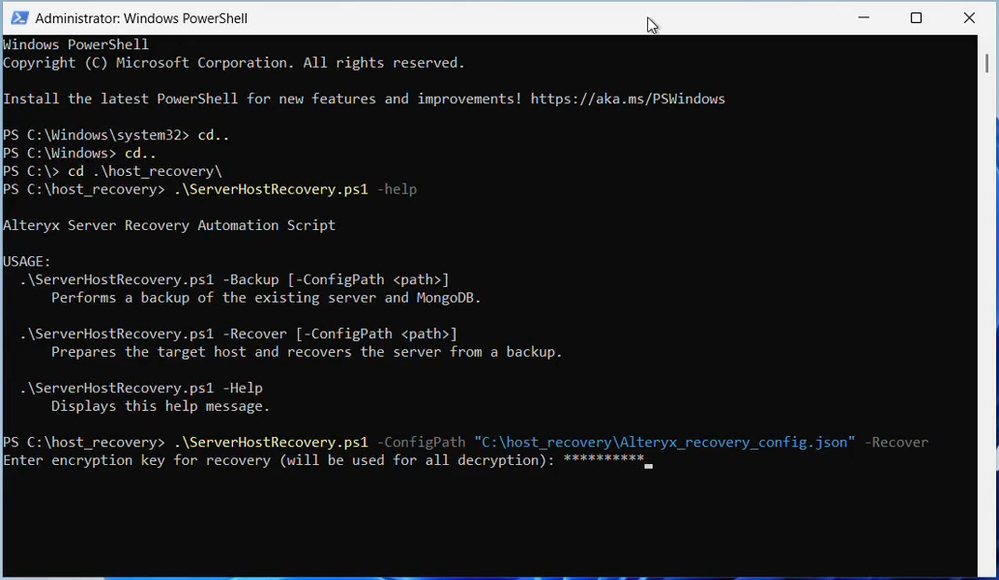
To get started:
- Navigate to the Alteryx Licensing and Downloads page
- Click “Download” next to Alteryx Server, select version 2025.2, and download “Server Host Recovery”
- Edit the configuration file alteryx_recovery_config.json and update the values for your environment
- Open PowerShell as Administrator
- If you see a digital signature error or script execution is blocked, run the helper script comm .\Enable-Run-ServerHostRecovery.ps1
- To perform a backup, run .\ServerHostRecovery.ps1 -Backup
- To recover the Server from your backup, run .\ServerHostRecovery.ps1 -Recover
Then go grab a cup of coffee while the script works its magic.
The script will then automate the first 4 steps of the host recovery process, including:
- Setting the time zone and ensuring the host can access Alteryx
- Verifying prerequisites and configuring Alteryx Server with default settings.
- Recovering your existing RuntimeSettings.xml, including restoring the controller token, encrypted storage keys, the Run As User and SMTP password, and transferring the encryption key
- Recovering your MongoDB back-up, including confirming a successful restoration and removing Alteryx Server locks
From there, you’ll take back over and restore any additional files and settings, including data drivers and connections. Then you can restart the Server and confirm full operation is restored.
Why You’ll Love It
Through automation, the script removes the most time-consuming and error‐prone work, allowing you to refocus your efforts on final testing and verification. This provides several benefits, including:
Fewer human errors
Since the most repetitive and error-prone tasks are automated, you reduce the “oops-I-forgot-to-do-X” risk.
Reduced manual work
The host recovery script automates over 20 manual tasks, dramatically cutting the time and effort required for upgrades so you can focus on higher-value initiatives.
Cleaner audit trail & visibility
The script logs every action and exception, making it easier to trace, troubleshoot, or hand off to another sysadmin. This strengthens governance and transparency across the upgrade process.
Easier, recurring upgrades
By streamlining host recovery, Alteryx Server upgrades become a repeatable, low-risk process. You can confidently upgrade more frequently and quickly take advantage of the latest Alteryx enhancements designed boost productivity and governance.
Upgrade Smarter, Not Harder
Preparing your environment to upgrade Alteryx Server doesn’t have to be a high-stress event. With host recovery automation, you can dramatically reduce disaster recovery and upgrade time, minimize errors, and give your team the confidence to keep Alteryx Server running smoothly for your mission-critical workflows
Happy upgrading!


