 This article is part of the Tool Mastery Series, a compilation of Knowledge Base contributions to introduce diverse working examples for Designer Tools. Here we’ll delve into uses of the Basic Data Profile Tool on our way to mastering the Alteryx Designer:
Inside the Data Investigation tool set you'll find the Basic Data Profile Tool. This tool is similar to the Field SummaryTool in that it provides information about each field within your data such as length, type, source, shortest and longest values, and more.It differs from the Field Summary however when you get to the missing data details. The Field Summary tool gives you a single value for Percent Missing, but makes no distinction between whether that percentage is Null or Empty values. The Basic Data Profile tool gives you a count of records that have Null values, and a count of records that areblank.
Taking it a step further, the Basic Data Profile Tool also lets you know the number of records that have leading and/or trailing whitespace so you can get a quick picture of the data you need to clean up.
The full list of of information provided is below:
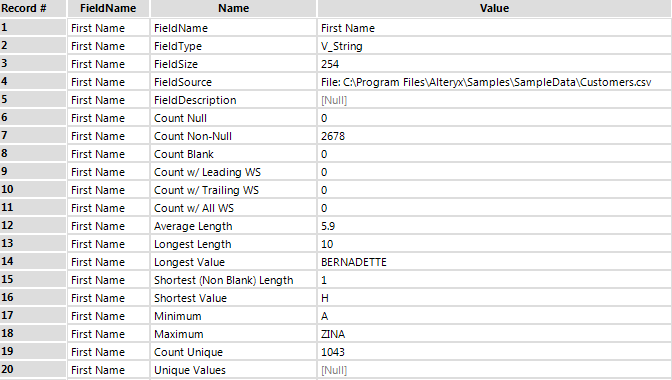
So how does this help? Maybe you're trying to build out a predictive model and keep getting strange errors from R. Missing data can cause those errors and this tool lets you quickly and easily see where you might have missing information that needs to be cleaned up.
Another possible use here is for joining data. A common question we receive is from users having issues trying to join their data knowing it should match but not actually getting any matches. The secret here is often leading/trailing spaces that are not readily obvious. This tool will show you which fields have records with those issues so you can quickly use the Data Cleanse Tool to remove them and tidy things up a bit before your join.
By now, you should have expert-level proficiency with the Basic Data Profile tool! If you can think of a use case we left out, feel free to use the comments section below! Consider yourself a Tool Master already? Let us know at community@alteryx.com if you’d like your creative tool uses to be featured in the Tool Mastery Series.
Stay tuned with our latest posts every Tool Tuesdayby following Alteryxon Twitter! If you want to master all the Designer tools, consider subscribingfor email notifications.


