In case you missed the announcement: The Alteryx One Fall Release is here! Learn more about the new features and capabilities here
ACT NOW: The Alteryx team will be retiring support for Community account recovery and Community email-change requests Early 2026. Make sure to check your account preferences in my.alteryx.com to make sure you have filled out your security questions. Learn more here
Start Free Trial

Alteryx Designer Desktop Discussions

Find answers, ask questions, and share expertise about Alteryx Designer Desktop and Intelligence Suite.
SOLVED

parse string with Regex

preethisisaac
8 - Asteroid


Hi All,

Please could you help me parse with Regex the below details i took from sftp location.

How to filter out the file name?


-rw-rw-rw- 1 user group 108057 May 9 2020 20200504_Cobra_3sensemedia.csv


Thanks,

Preethi

2 REPLIES 2
echuong1
Alteryx Alumni (Retired)

Are you just looking to grab the last part? If so, the attached should work. It's looking for the last string, separated by a space.


.+\s(.+)


atcodedog05
22 - Nova
22 - Nova

Hi @preethisisaac 


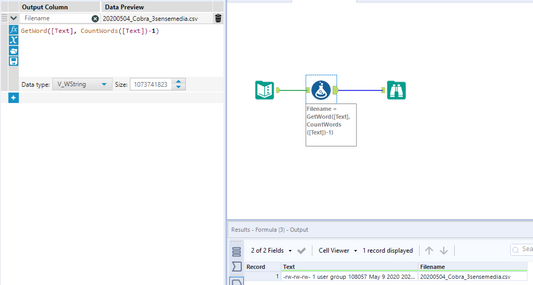
Here is another way to do it.


Formula

GetWord([Text], CountWords([Text])-1)


Workflow:

atcodedog05_1-1611680722862.png


Here 


CountWords([Text]) gets number of words

CountWords([Text])-1 gets last word position (since position is from 0 to n-1)

GetWord([Text], CountWords([Text])-1) gets the word at last position


Hope this helps 🙂 Feel to ask if you have any questions

Labels
Top Solution Authors