The Alteryx Community is a finalist in three 2026 CMX Awards! Help us win Customer Support Community, Most Engaged Community, and User Group Program of the Year - vote now! (it only takes about 2 minutes) before January 9.
ACT NOW: The Alteryx team will be retiring support for Community account recovery and Community email-change requests Early 2026. Make sure to check your account preferences in my.alteryx.com to make sure you have filled out your security questions. Learn more here
Start Free Trial

Alteryx Designer Desktop Discussions

Find answers, ask questions, and share expertise about Alteryx Designer Desktop and Intelligence Suite.
SOLVED

Why Macro output is different between running inside and outside the Macro workflow?

goosekong
6 - Meteoroid

Hi all,


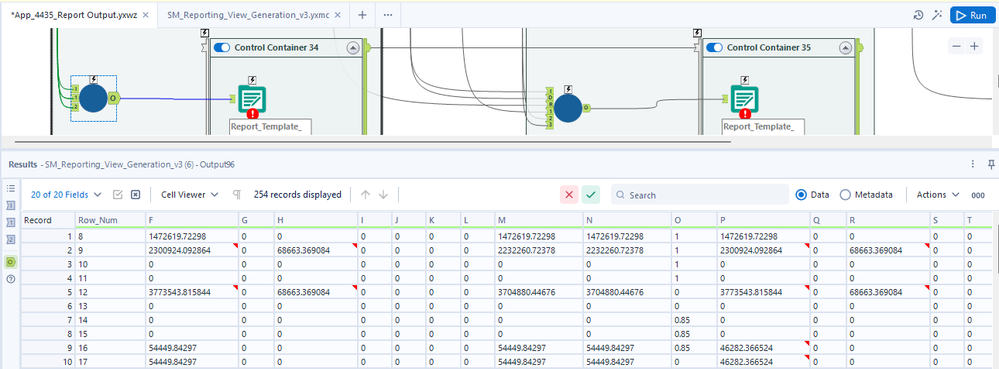
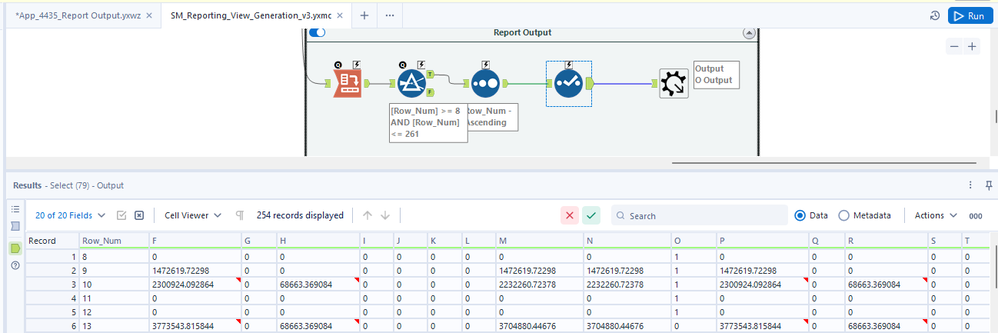
I got a weird situation when I run the macro workflow inside, the first row of field F of the output is 0. However when I run the macro in an analytical app, the first row of field F of the output is not 0. All the output moves up by one row. Both the data sources between the inside macro workflow and outside macro workflow are the same files. Why it happens?


Run inside the macro workflow:
 

1.png


Run outside the macro workflow:

2.png


4 REPLIES 4
davidskaife
14 - Magnetar

Hi @goosekong 


Are you able to share the Macro/Workflow and data at all? You can export the Workflow as a package, which will then include the data input (if it's Excel/CSV etc) plus the Macro's

goosekong
6 - Meteoroid

Sorry the data include some business information which I can't share online. Do you have any clue about this situation?

davidskaife
14 - Magnetar

Can only summerise that something is different with the data/inputs when inside the Macro, compared to when you run it as an App. Tricky to troubleshoot without seeing the workflow.


Are you able to remove the sensitive data/mock something up at all?


goosekong
6 - Meteoroid

Thanks. The problem was solved, which was caused by different input data.

Labels
Top Solution Authors