In case you missed the announcement: The Alteryx One Fall Release is here! Learn more about the new features and capabilities here
ACT NOW: The Alteryx team will be retiring support for Community account recovery and Community email-change requests Early 2026. Make sure to check your account preferences in my.alteryx.com to make sure you have filled out your security questions. Learn more here
Start Free Trial

Alteryx Designer Desktop Discussions

Find answers, ask questions, and share expertise about Alteryx Designer Desktop and Intelligence Suite.
SOLVED

Two part problem - rows to string and substitute string in query

jeffv
8 - Asteroid

Hi,


Using Alteryx, I'd like to take a column from a query transform it into a list and then use that list as part of a second query.


As an example, col1 has rows 1,2,3  I can transform it into a list 1,2,3 using the summarize but I need it to be '1','2','3'.  I believe I can use a regex to add the apostrophes to the string (I thought I could configure the summarize tool but maybe not).


Next can I take the above string '1','2','3' and replace it in part of a query such as   'select * from table where f1 in (<replacetext>);'  where the above string can be substituted for <replacetext>.  I think I'm close by using dynamic input but having some struggles so thought I might reach out to the experts.


Thanks,

Jeff


1 REPLY 1
jdunkerley79
ACE Emeritus
ACE Emeritus

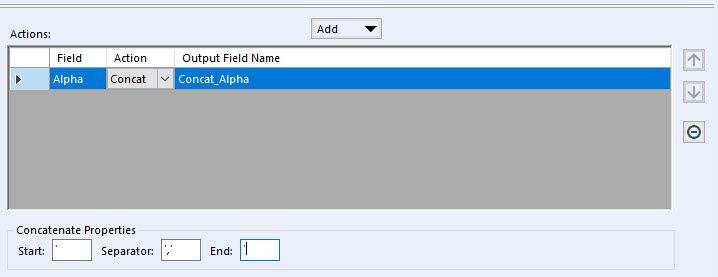
In the summarise tool when doing the concatenate you can specify that the string should start with a ' and use ',' to join and finish with another ':


2019-01-02_20-26-23.jpg

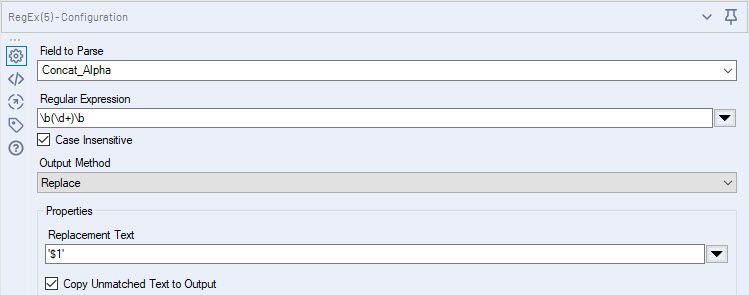
If you wish to do by REGEX then: 

2019-01-02_20-27-07.jpg

Expression:

\b(\d+)\b

Replacement:

'$1'

should work.


In terms of the dynamic input, I would suggest a query like:

select * from table where f1 in ('XXX')

and then as you describe replace a specific string (the 'XXX' part):

2019-01-02_20-38-57.jpg


One thing to check from what you show is that the f1 field is a string field as if not then you need no single quotes. Also if is string field make sure no entries in list with a single quote as that will break it.


Sample of first part is attached

.

Labels
Top Solution Authors