I'm getting an error in Alteryx and I'm hoping someone might have some ideas on how to fix this. I'm trying to use blob tools to read in an Excel template and write a copy of that template. The next steps would be to then write over that copy of the template with my data and then send out an automated email with the report attached. This all works perfectly when I save the template and new file locally, but I'm getting an error when attempting to do this on a shared network drive: "Error creating the file: The process cannot access the file because it is being used by another process (32)". It looks like the blob output tool is writing the copy of the template at the same time as the blob input is still reading the template in which is causing the error. When I check the output file afterwards everything is outputted correctly, but the error message is preventing the email reporting tool from sending the automated email at the end of the workflow. A couple of things I've tried without success: 1. Saving the copy of the template in a different shared drive folder than the original template 2. Using a "block until done" tool to wait for the blob input tool to finish before starting the blob output (doesn't seem to work because the blob output has to be connected to the blob input)
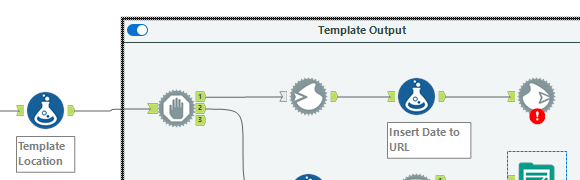
I should add too that I don't have the template open when running the workflow (and it's extremely unlikely that anyone else would have this open)
Thanks!


