In case you missed the announcement: The Alteryx One Fall Release is here! Learn more about the new features and capabilities here
ACT NOW: The Alteryx team will be retiring support for Community account recovery and Community email-change requests Early 2026. Make sure to check your account preferences in my.alteryx.com to make sure you have filled out your security questions. Learn more here
Start Free Trial

Alteryx Designer Desktop Discussions

Find answers, ask questions, and share expertise about Alteryx Designer Desktop and Intelligence Suite.
SOLVED

Remove matched rows from input file to generate new output file

Saratnarendran
7 - Meteor

Hi all,


I am new to Alteryx and I need to create a workflow that takes two input files (Sample IN 1) and (Sample IN 2). Sample IN 1 has 3 tabs (2 Input tabs and 1 output tab--> Initially output tab has some dummy data (highlighted in yellow)). The workflow should compare the Input tabs of Sample IN 1 with Sample IN 2 and find for match. If records are matched, then those records need to be moved to the output tab (below dummy data) of Sample IN 1. (Note: Records need to be removed from tab 1 & 2, once they are moved to Output tab. That's why they are highlighted). I have attached the corresponding excel file that needs to be turned into a workflow. Please help.


Thanks!

3 REPLIES 3
ChrisTX
16 - Nebula
16 - Nebula

You can use a Join tool.


What have you tried so far?  Do you have a sample workflow?  Are you just stuck, not sure where to start?


If you're just starting, the Learning Paths are a great resource:


Community > Learn > Academy > Learning Paths

https://community.alteryx.com/t5/Learning-Paths/tkb-p/learning-path


Chris

Saratnarendran
7 - Meteor

Hi Chris,


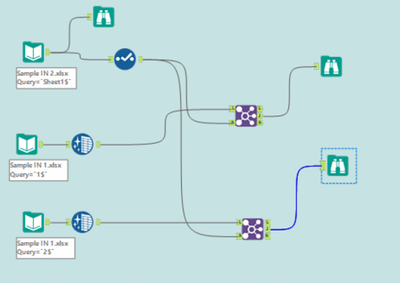
Thank you for the quick response. Actually I have used the Join tool and have a sample workflow as attached. But I have it as two separate outputs. I need those to be combined into the same input file and also remove those matched records from tabs 1 and 2. But, I am stuck at this step. Sorry for not posting the workflow before.


Can you please help?

S_N_0-1661372498242.png


DataNath
17 - Castor
17 - Castor

How does this look @Saratnarendran? My only concern is this took a little bit of extra cleanup to remedy some mismatched field names (extra whitespace) and remove null rows.

Labels
Top Solution Authors