In case you missed the announcement: The Alteryx One Fall Release is here! Learn more about the new features and capabilities here
ACT NOW: The Alteryx team will be retiring support for Community account recovery and Community email-change requests after December 31, 2025. Set up your security questions now so you can recover your account anytime, just log out and back in to get started. Learn more here
Start Free Trial

Alteryx Designer Desktop Discussions

Find answers, ask questions, and share expertise about Alteryx Designer Desktop and Intelligence Suite.
SOLVED

RegEx help

Brad1
11 - Bolide

I've got a .txt file.


Store#Store_Name|Store_Address


I need to add a pipe after Store_Name to make this file work.  The Store Name is always the same.  The Store # - I'm not sure if the number are all the same length.  They might be.  How can I add a delimiter after a certain String is found?


#123|Kmart123_Main_St

500|Kmart200_North_St


goes to:


#123|Kmart|123_Main_St

500|Kmart|200_North_St


Thanks in advance for any help.

1 REPLY 1
atcodedog05
22 - Nova
22 - Nova

Hi @Brad1 


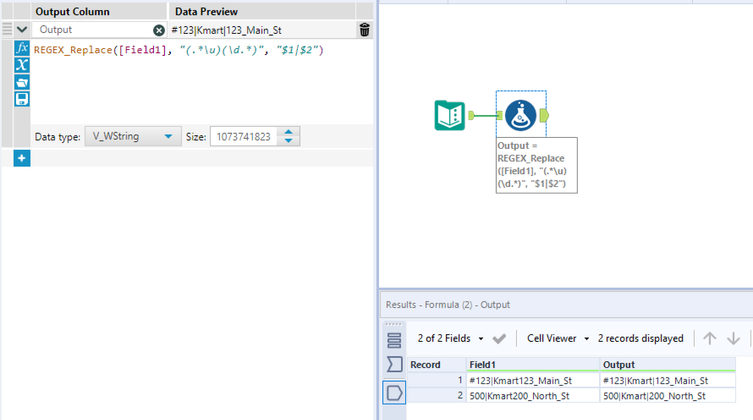
You can use regex formula like below. Consider pipe is needed when character is followed number. Place followed by number your scenario.


REGEX_Replace([Field1], "(.*\u)(\d.*)", "$1|$2")


atcodedog05_0-1622569578223.png


Hope this helps 🙂

Labels
Top Solution Authors