In case you missed the announcement: The Alteryx One Fall Release is here! Learn more about the new features and capabilities here
ACT NOW: The Alteryx team will be retiring support for Community account recovery and Community email-change requests Early 2026. Make sure to check your account preferences in my.alteryx.com to make sure you have filled out your security questions. Learn more here
Start Free Trial

Alteryx Designer Desktop Discussions

Find answers, ask questions, and share expertise about Alteryx Designer Desktop and Intelligence Suite.
SOLVED

Python Tool notebook not loading

Tony_Castillo
10 - Fireball

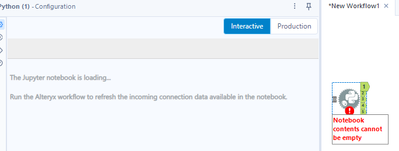
I am using Designer Desktop v2023.2.1.7 and recently downloaded the SharePoint Input/Output Tool Version 2.4.2 When I try to use a new Python Tool on a new canvas, the notebook does not load. Even the Python Tool examples will not run. Attached are the workflow messages when I run the Python Tool Example workflow.


I've tried uninstalling the SharePoint tool, and uninstalling and reinstalling Designer desktop, and still no luck. Any help is truly appreciated.


2024-02-14_22-35-40.png


2 REPLIES 2
Tony_Castillo
10 - Fireball

posting a fix just in case anyone else has this issue in the future. Go to C:\Users\t[user]\AppData\Roaming\Python\Python38 and change the name of the 'site-packages' folder to 'site-packages_old'. Then restart your Alteryx designer. Should be all good after that.

jehoppis
6 - Meteoroid

Thanks so much! I have had this issue for a while. Worked for me!

Labels
Top Solution Authors