ACT NOW: The Alteryx team will be retiring support for Community account recovery and Community email-change requests Early 2026. Make sure to check your account preferences in my.alteryx.com to make sure you have filled out your security questions. Learn more here
Start Free Trial

Alteryx Designer Desktop Discussions

Find answers, ask questions, and share expertise about Alteryx Designer Desktop and Intelligence Suite.
SOLVED

PARSE THE VALUE

dunkindonut7777
8 - Asteroid

Hi can you help me how to remove the unnecessary characters using regex formula?


DateExpected Output
2025-01-03T00:00:002025-01-03


Can you help me retain the date values?

4 REPLIES 4
binu_acs
21 - Polaris

@dunkindonut7777 

Regex_Replace([Date],”(.*)T.*”,”$1”)

binu_acs
21 - Polaris

@dunkindonut7777 

binu_acs_0-1761749290904.png

Regex_Replace([Date],'(.*)T.*','$1')
aatalai
15 - Aurora

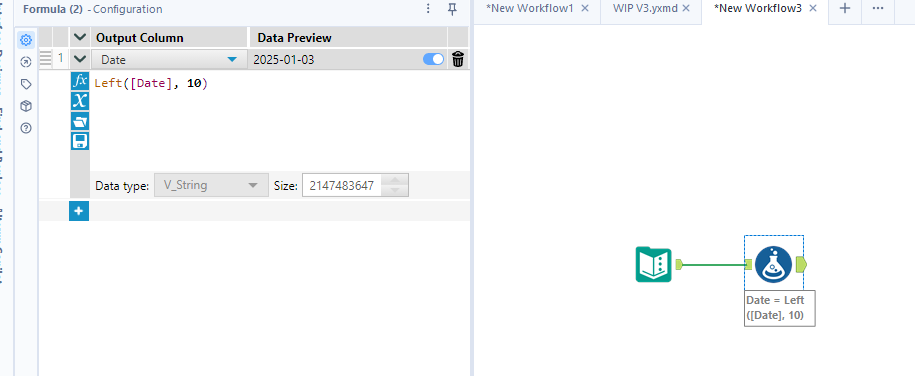
@dunkindonut7777  if you are willing to use the left formula you might get a simpler solution 


Left([Date], 10)

 Screenshot 2025-10-29 165205.png

jrlindem
12 - Quasar

@dunkindonut7777 

I respect that you likely have a reason for wanting to do this via REGEX, and @binu_acs has certainly addressed your question as is, but I'm altogether curious why re-assigning the data type in a SELECT tool isn't being leveraged as it is the absolute simplest solution...


jrlindem_1-1761791820336.png


Anyway, just another idea to consider if REGEX isn't absolutely necessary.  Cheers, -Jay

Labels
Top Solution Authors