In case you missed the announcement: The Alteryx One Fall Release is here! Learn more about the new features and capabilities here
ACT NOW: The Alteryx team will be retiring support for Community account recovery and Community email-change requests after December 31, 2025. Set up your security questions now so you can recover your account anytime, just log out and back in to get started. Learn more here
Start Free Trial

Alteryx Designer Desktop Discussions

Find answers, ask questions, and share expertise about Alteryx Designer Desktop and Intelligence Suite.
SOLVED

Multi Row Formula help!

JamesBarzda
7 - Meteor

Hi all,


I'm struggling to configure a multi-row formula tool to do the following


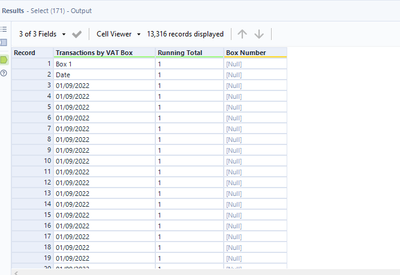
Requirements - whenever the word 'Box' is found in 'transactions by VAT box' column, I need the value to appear in the 'Box Number' column. E.g. for the rows in the screenshot, 'Box Number' would read 'Box 1' and then, when Box 2 appears in the 'Transactions by VAT Box' column, if would update and read box 2, and so on for box 3, box 4, box 5, box 6, box 7, box 8 and box 9.


The 'Box Number' value would continue until the next box contains is found e.g. 'Box Number' would contain 'Box 1' until 'Box 2' is found in the 'Transactions by VAT Box' column


Thanks in advance!
 

JamesBarzda_1-1670329356801.png


3 REPLIES 3
ShankerV
17 - Castor

Hi @JamesBarzda 


I believe you are expecting the below output.


ShankerV_2-1670331185977.png


ShankerV_1-1670331166742.png


Many thanks

Shanker V


Christina_H
14 - Magnetar

Try this formula:

if left([Transactions by VAT box],3)="Box" then [Transactions by VAT box] else [Row-1:Box number] endif

Christina_H_0-1670331495772.png

ShankerV
17 - Castor

@JamesBarzda 


As a testing, have tried with huge dataset also.

Working as expected if I have in different formats too.


ShankerV_0-1670331718059.png

Hope your issue is resolved. Feel free to mark helpful answers as a solution, so that future users with the same issue can find them easier!!!!


Many thanks

Shanker V


Labels
Top Solution Authors