Alteryx Designer Desktop Discussions
Find answers, ask questions, and share expertise about Alteryx Designer Desktop and Intelligence Suite.- Community
- :
- Community
- :
- Participate
- :
- Discussions
- :
- Designer Desktop
- :
- Iterating to Find Combinations
Iterating to Find Combinations
- Suscribirse a un feed RSS
- Marcar tema como nuevo
- Marcar tema como leído
- Flotar este Tema para el usuario actual
- Favorito
- Suscribir
- Silenciar
- Página de impresión sencilla

- Marcar como nuevo
- Favorito
- Suscribir
- Silenciar
- Suscribirse a un feed RSS
- Resaltar
- Imprimir
- Notificar al moderador
Hello Community,
In the attached document, I have a dataset (CombinationsData tab) which is just a reference table to find all the different combinations. Then I have my data (ActualData tab) which displays my raw data. For each combination of SecurityPoint1 and SecurityPoint2, I have to look it up in the ActualData to see if both points exist AND the JobRole matches.
If they match, I need to take the Violation from CombinationsData tab and apply it to my output.
Example:
Under CombinationsData for Templates ID T00379 and T10101, JobRole Clinical Staff and Surgeon, Security Point 1 = 124 and Security Point 2 = 33 exists
Under ActualData Security Points column 124 and 33 exist for Clinical Staff only (highlighted in yellow)
In the Expected Output, only the Clinical Staff row should populate
Any idea how I can approach this? I have about 60k combinations and 5 million rows of data in my actual dataset.
¡Resuelto! Ir a solución.


- Marcar como nuevo
- Favorito
- Suscribir
- Silenciar
- Suscribirse a un feed RSS
- Resaltar
- Imprimir
- Notificar al moderador
Hi @mystasz
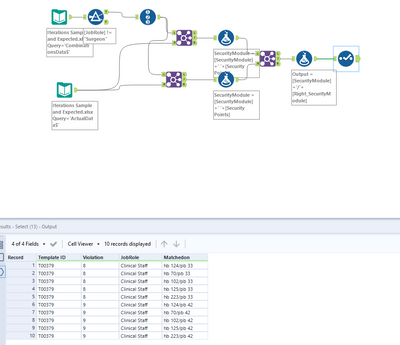
Yes, its possible via Filter tool, Join and Multi row formula..
Please find the solution below.
Shanker V
- Marcar como nuevo
- Favorito
- Suscribir
- Silenciar
- Suscribirse a un feed RSS
- Resaltar
- Imprimir
- Notificar al moderador
Thank you. I don't see a solution, can you try reattaching?
- Marcar como nuevo
- Favorito
- Suscribir
- Silenciar
- Suscribirse a un feed RSS
- Resaltar
- Imprimir
- Notificar al moderador
- Marcar como nuevo
- Favorito
- Suscribir
- Silenciar
- Suscribirse a un feed RSS
- Resaltar
- Imprimir
- Notificar al moderador
- Marcar como nuevo
- Favorito
- Suscribir
- Silenciar
- Suscribirse a un feed RSS
- Resaltar
- Imprimir
- Notificar al moderador
Would you be able to attach your workflow so I can see whats in the joins and the formulas?
- Marcar como nuevo
- Favorito
- Suscribir
- Silenciar
- Suscribirse a un feed RSS
- Resaltar
- Imprimir
- Notificar al moderador
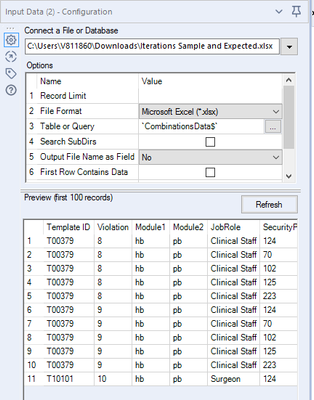
Step 1: Insert Combination data
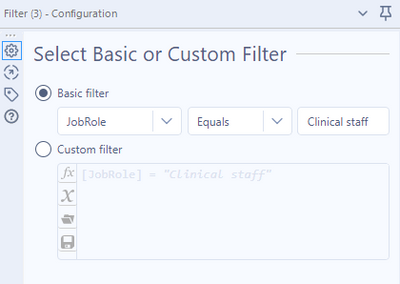
Step 2: Use filer to include only Clinical staff
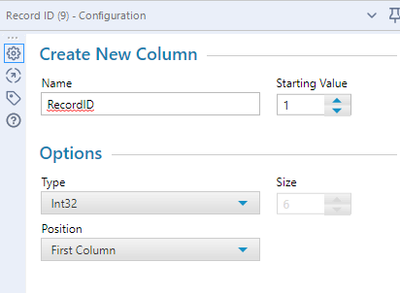
Step 3: Use the Record ID tool
- Marcar como nuevo
- Favorito
- Suscribir
- Silenciar
- Suscribirse a un feed RSS
- Resaltar
- Imprimir
- Notificar al moderador
Step 4: Input Actual data
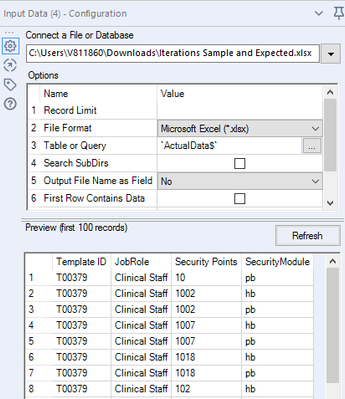
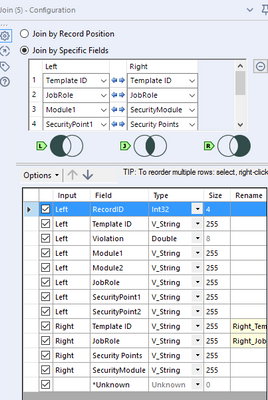
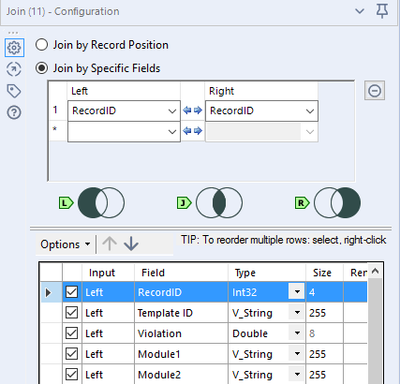
Step 5: Use the join L node from Record ID
R node from Actual data
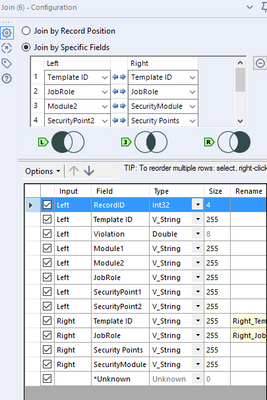
Step 6: Create one more join with same L and R node
But join by specific fields will be different
- Marcar como nuevo
- Favorito
- Suscribir
- Silenciar
- Suscribirse a un feed RSS
- Resaltar
- Imprimir
- Notificar al moderador
Step 8: Formula tool
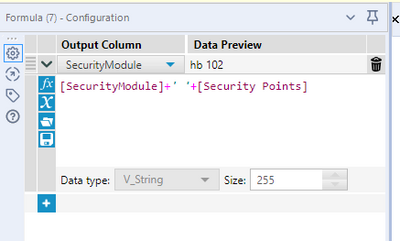
Next join both formula tools
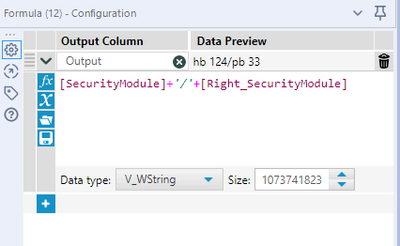
Next comes the last formula tool
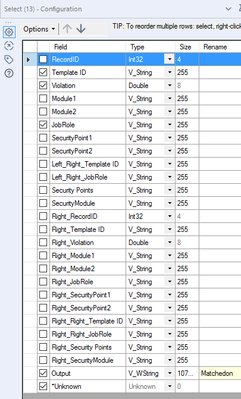
Used Select tool to remove the unwanted columns
- Marcar como nuevo
- Favorito
- Suscribir
- Silenciar
- Suscribirse a un feed RSS
- Resaltar
- Imprimir
- Notificar al moderador
Hi @mystasz
I have explained the solution, can you please replicate the same in your Alteryx.
Sorry couldn't attach the workflow as my Alteryx version is not updated, so couldn't save the workflow.

- « Anterior
-
- 1
- 2
- Siguiente »
-
Academy
6 -
ADAPT
2 -
Adobe
204 -
Advent of Code
3 -
Alias Manager
78 -
Alteryx Copilot
26 -
Alteryx Designer
7 -
Alteryx Editions
95 -
Alteryx Practice
20 -
Amazon S3
149 -
AMP Engine
252 -
Announcement
1 -
API
1.208 -
App Builder
116 -
Apps
1.360 -
Assets | Wealth Management
1 -
Basic Creator
15 -
Batch Macro
1.559 -
Behavior Analysis
246 -
Best Practices
2.695 -
Bug
719 -
Bugs & Issues
1 -
Calgary
67 -
CASS
53 -
Chained App
268 -
Common Use Cases
3.825 -
Community
26 -
Computer Vision
86 -
Connectors
1.426 -
Conversation Starter
3 -
COVID-19
1 -
Custom Formula Function
1 -
Custom Tools
1.938 -
Data
1 -
Data Challenge
10 -
Data Investigation
3.487 -
Data Science
3 -
Database Connection
2.220 -
Datasets
5.222 -
Date Time
3.227 -
Demographic Analysis
186 -
Designer Cloud
742 -
Developer
4.372 -
Developer Tools
3.530 -
Documentation
527 -
Download
1.037 -
Dynamic Processing
2.939 -
Email
928 -
Engine
145 -
Enterprise (Edition)
1 -
Error Message
2.258 -
Events
198 -
Expression
1.868 -
Financial Services
1 -
Full Creator
2 -
Fun
2 -
Fuzzy Match
712 -
Gallery
666 -
GenAI Tools
3 -
General
2 -
Google Analytics
155 -
Help
4.708 -
In Database
966 -
Input
4.293 -
Installation
361 -
Interface Tools
1.901 -
Iterative Macro
1.094 -
Join
1.958 -
Licensing
252 -
Location Optimizer
60 -
Machine Learning
260 -
Macros
2.864 -
Marketo
12 -
Marketplace
23 -
MongoDB
82 -
Off-Topic
5 -
Optimization
751 -
Output
5.255 -
Parse
2.328 -
Power BI
228 -
Predictive Analysis
937 -
Preparation
5.169 -
Prescriptive Analytics
206 -
Professional (Edition)
4 -
Publish
257 -
Python
855 -
Qlik
39 -
Question
1 -
Questions
2 -
R Tool
476 -
Regex
2.339 -
Reporting
2.434 -
Resource
1 -
Run Command
575 -
Salesforce
277 -
Scheduler
411 -
Search Feedback
3 -
Server
630 -
Settings
935 -
Setup & Configuration
3 -
Sharepoint
627 -
Spatial Analysis
599 -
Starter (Edition)
1 -
Tableau
512 -
Tax & Audit
1 -
Text Mining
468 -
Thursday Thought
4 -
Time Series
431 -
Tips and Tricks
4.187 -
Topic of Interest
1.126 -
Transformation
3.730 -
Twitter
23 -
Udacity
84 -
Updates
1 -
Viewer
3 -
Workflow
9.980
- « Anterior
- Siguiente »


