In case you missed the announcement: The Alteryx One Fall Release is here! Learn more about the new features and capabilities here
ACT NOW: The Alteryx team will be retiring support for Community account recovery and Community email-change requests after December 31, 2025. Make sure to check your account preferences in my.alteryx.com to make sure you have filled out your security questions. Learn more here
Start Free Trial

Alteryx Designer Desktop Discussions

Find answers, ask questions, and share expertise about Alteryx Designer Desktop and Intelligence Suite.
SOLVED

Is it possible to remove all blank/null cells from a table

NatSnook
8 - Asteroid

sample.png


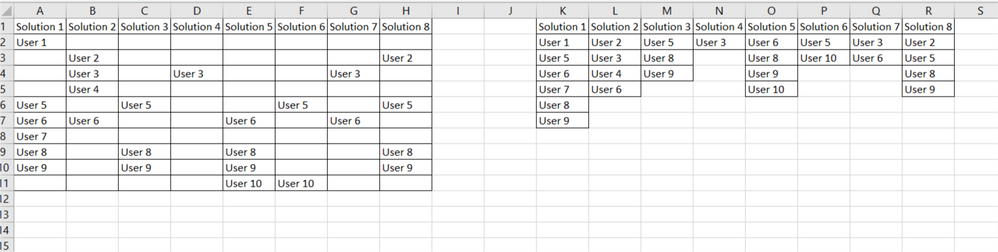
Apologies in advance if this is a stupid question... can anyone tell me how to get from the dataset on the left to the result on the right removing all the null/empty cells?

2 REPLIES 2
Kenda
16 - Nebula
16 - Nebula

Hi @NatSnook 


So you can't actually say get rid of row 3 in field 1 if row 3 needs to exist for field 2 in Alteryx. Put another way, if a row needs to exist for one field, it will exist for all fields in Alteryx. They can still be empty, though, so that when you export the data to Excel, there will be no data there.


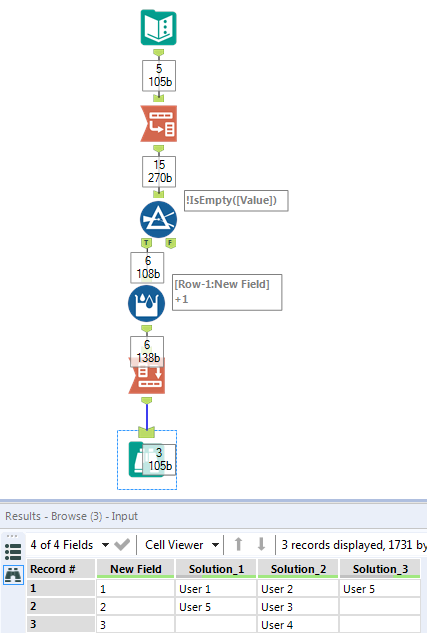
Outside of this, it is quite easy to accomplish what you're wanting and get rid of blank rows that separate populated records within each field. See the attached workflow. First I transpose the data to get all of the fields in one column. I then only keep the records that are not empty. Lastly I create a sort of record ID so that when I Cross Tab back to having the solutions as the headers, each value will be on its own row.


Hope this helps!


Capture.PNG

NatSnook
8 - Asteroid

Legend! thanks so much

Labels
Top Solution Authors