In case you missed the announcement: The Alteryx One Fall Release is here! Learn more about the new features and capabilities here
ACT NOW: The Alteryx team will be retiring support for Community account recovery and Community email-change requests after December 31, 2025. Set up your security questions now so you can recover your account anytime, just log out and back in to get started. Learn more here
Start Free Trial

Alteryx Designer Desktop Discussions

Find answers, ask questions, and share expertise about Alteryx Designer Desktop and Intelligence Suite.
SOLVED

How to split data into different sheets of a single excel file at the same time?

diabolic
7 - Meteor

Testx.jpg

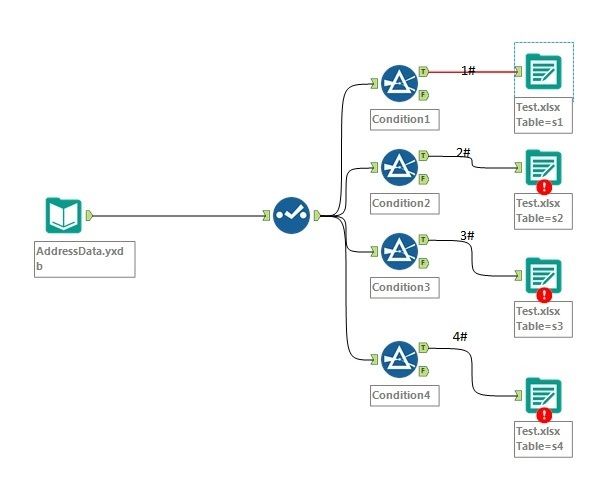
I just create a sample image as above to illustrate my question. As shown in the image, my data are split into 4 sheets (s1, s2, s3 and s4) and "Output Options" are all set to "Overwrite Sheet (Drop)". All outputs are contained by file Test.xlsx.

When I run the workflow, only s1 completed. Other 3 sheets are in error "

Error: Output Data (10): Unable to open file for write: ..\Test.xlsx Error Opening file: ..\Test.xlsx: The process cannot access the file because it is being used by another process. (32)".


However, if I only keep connect 2# and break other connections, then run the workflow. s2 can be done correctly. I can also do this on connect 3# and 4# separately, all of them are succeed.


Is there any way to produce my output sheets at the same time rather than run the workflow one by one?

3 REPLIES 3
LordNeilLord
15 - Aurora

Hey @diabolic


You need to use the block until done tool here to avoid the overwrite errors:

BUD.PNG

diabolic
7 - Meteor

Thanks for the fast reply. It does work!

gcf
5 - Atom

What is the formula used in the filter tool to get the data per sheet? 


Labels
Top Solution Authors