In case you missed the announcement: The Alteryx One Fall Release is here! Learn more about the new features and capabilities here
ACT NOW: The Alteryx team will be retiring support for Community account recovery and Community email-change requests after December 31, 2025. Set up your security questions now so you can recover your account anytime, just log out and back in to get started. Learn more here
Start Free Trial

Alteryx Designer Desktop Discussions

Find answers, ask questions, and share expertise about Alteryx Designer Desktop and Intelligence Suite.
SOLVED

How to replace data from diferent row

BautistaC888
8 - Asteroid

Hello,
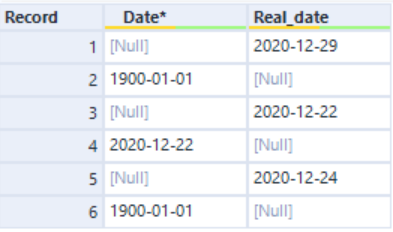
I need to replace the 1900-01-01 in the Date field for the data on the Real_Date field on the row above.
Thank you.


BautistaCaparelli_0-1612205974574.png


1 REPLY 1
DannyS
Alteryx Alumni (Retired)

Hi @BautistaC888 ,


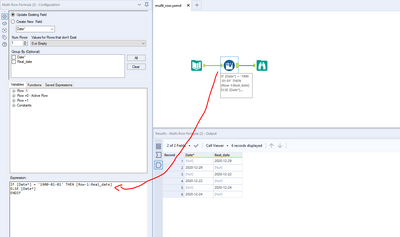
If I'm understanding your question correctly, you're looking to replace the cells that have value '1900-01-01' in the Date* column with the cells in the Real_date column that come one record above. If that is this case, you can do this in one step using the Multi Row Formula tool in the Preparation category by creating a simple conditional expression:


DannyS_0-1612208640020.png


I've attached a workflow to demonstrate.


Let me know if this helps!

Labels
Top Solution Authors