In case you missed the announcement: The Alteryx One Fall Release is here! Learn more about the new features and capabilities here
ACT NOW: The Alteryx team will be retiring support for Community account recovery and Community email-change requests after December 31, 2025. Set up your security questions now so you can recover your account anytime, just log out and back in to get started. Learn more here
Start Free Trial

Alteryx Designer Desktop Discussions

Find answers, ask questions, and share expertise about Alteryx Designer Desktop and Intelligence Suite.

How to fill multiple null cells in order to calculate average?

jessiedengjie
5 - Atom

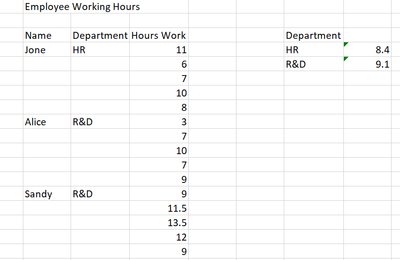
I have this example data, the excel has some description text inside, so the auto-header might be wrong. How to clean up?


And there are multiple multiple empty cells, how can I calculate the average working hours per departments?


Thank you so much for your solutions!!
 

jessiedengjie_0-1668820237784.png


2 REPLIES 2
flying008
15 - Aurora

Hi, @jessiedengjie 


this way for you :

1- Multi-Row Formula: 

iif(isempty([Department]),[Row-1:Department],[Department])


2- Summarize:  Group By [Department] , Average of [Hour Work]

录制_2022_11_19_10_37_26_187.gif

DenisZ
11 - Bolide

Please find attached workflow


DenisZ_0-1669035041142.png


Do mark it as solved if it solved your issue. 

Labels
Top Solution Authors