ACT NOW: The Alteryx team will be retiring support for Community account recovery and Community email-change requests Early 2026. Make sure to check your account preferences in my.alteryx.com to make sure you have filled out your security questions. Learn more here
Start Free Trial

Alteryx Designer Desktop Discussions

Find answers, ask questions, and share expertise about Alteryx Designer Desktop and Intelligence Suite.
SOLVED

Formula for flat fee plus percentage?

skeen503979
8 - Asteroid

Hi there.


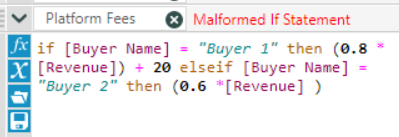
I'm trying to create a column that displays a platform fee for sales to specific buyers.  One buyer is a flat percentage of revenue (8%) plus a specific dollar ($20) amount while another buyer is just a flat percentage (6%). 


What would the correct formula look like? 


skeen503979_0-1585001224747.png


2 REPLIES 2
JosephSerpis
17 - Castor
17 - Castor

Hi @skeen503979 try this syntax also ensure your Data type is a numeric type like a double as the formula defaults to V_WString.


IF [Buyer Name] = "Buyer 1" then (0.8 * [Revenue]) +20 Elseif [Buyer Name] = "Buyer 2" then (0.6) * [Revenue] Else 0 Endif

echuong1
Alteryx Alumni (Retired)

I agree with the syntax of the solution above, but that formula would give you 80% +20 and 60% respectively. 


IF [Buyer Name] = "Buyer 1" then (0.08 * [Revenue]) +20 Elseif [Buyer Name] = "Buyer 2" then (0.06) * [Revenue] Else 0 Endif


Essentially, the formula is saying if the Buyer Name is Buyer 1, then use 8% of revenue + 20. If the Buyer Name is Buyer 2, then use 6% of revenue. If the Buyer Name is not Buyer 1 or Buyer 2 (essentially your catchall for the rest of the records), use 0.


Also, ensure you change the data type at the bottom of the formula to a numeric field type like Double. The default is a string (text) value.

Labels
Top Solution Authors