In case you missed the announcement: The Alteryx One Fall Release is here! Learn more about the new features and capabilities here
ACT NOW: The Alteryx team will be retiring support for Community account recovery and Community email-change requests after December 31, 2025. Make sure to check your account preferences in my.alteryx.com to make sure you have filled out your security questions. Learn more here
Start Free Trial

Alteryx Designer Desktop Discussions

Find answers, ask questions, and share expertise about Alteryx Designer Desktop and Intelligence Suite.
SOLVED

Excel Cross Tab Formatting

Orion9542
5 - Atom

Hi All,


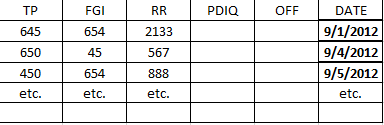
I've inherited an Excel workbook in the following format:

 sample data.PNG


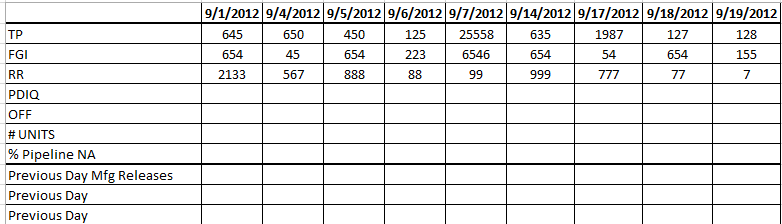
I would like to transform my data so it looks as follows:

sample data 2.PNG 

 Any ideas?

Thanks


2 REPLIES 2
BenMoss
ACE Emeritus
ACE Emeritus

Step 1. Transpose your data. Your date fields should act as your 'data fields' and your other fields should be your key fields.


Step 2. Cross-tab your data. Your date field should by your group by field. Your header field will be the name of your column A, then the value field will be the field 'value' generated from your transpose.


Give this a try and get back to us if you need further support :)


Ben

Orion9542
5 - Atom

Worked like a charm!  

Thanks,

-Jon

Labels
Top Solution Authors