I have a very simple powershell script that updates a SharePoint connected Excel list and would like to run the refresh command prior to kicking off my workflow.
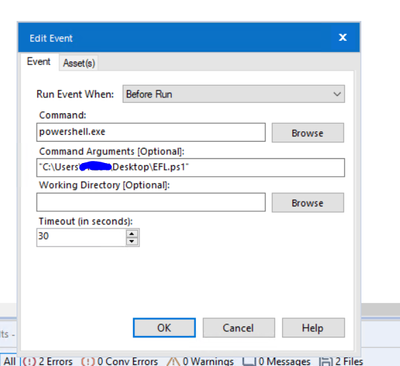
I have the PS1 script and Excel files stored locally to my C: drive and the powershell command window opens but I continue to get the following error.
Error: Designer x64: The Designer x64 reported: Error running Event #1: The external program "powershell.exe" returned an error code: 1: The system cannot find the file specified. (2)
Any suggestions?
Hi @Zaruba_6 ,
Ouch. that Excel hell sounds awful. You can cut Excel out of that entire process...
Anyway...
Try removing the .exe for Powershell in the command tool:
Hope that helps,
M.
@mceleavey
Unfortunately I am getting the same error. Seems to be an issue with PowerShell finding the file to update. Trust me if I could avoid the Excel route I would but do to some system constraints around SharePoint online I am married to the solution.
Oddly enough the script runs great using task manager but, I was hoping to integrate in the workflow so when I can eventually schedule I only have one process to manage.
Thanks

