I think i figured this out for now - I used a formula tool to with
DateTimeAdd([StartDate],4,"years")
To get my last date to generate a row for.
Then in the generate rows tool I used
init: [StartDate]
condition: [StartDate] <= [LastStartDate]
Loop exp: DateTimeAdd([StartDate],[cycle],"months")
After that I used a formula tool with DateTimeAdd() to add the duration in days to the StartDate to generate the EndDate
---------------------------------------------------------------------------
I have a request that I think can be done with the Generate Rows Tool.
This will be in two parts.
The first part is working with a table of locations and their schedules for a certain event.
Starting month - first month this will start.
Duration - How long the event lasts
Cycle - Number of months in between cycle. For example, 12 = annually, 18 = every 18 months, 24 = every two years etc.
With this, I want to generate an output that will list the start and end dates for the next x years. I want this to be dynamic so this will be something like currentYear + 4 years to get a 5 year view of the future.
I started working with the Generate Rows Tool but figured I'd ask while I work in case someone already knows how to recreate this.
Input table:
| Location | Starting Month | Duration | Cycle |
| Loc1 | 10 | 3 | 12 |
| Loc2 | 6 | 5 | 18 |
| Loc3 | 2 | 4.5 | 24 |
Output table:
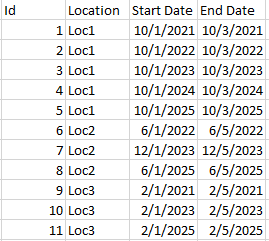
Side note: feel free to edit the input month to be a specific date (10 = 10/1/2021). I'm using a formula to convert this.


