Alteryx Designer Desktop Discussions
Find answers, ask questions, and share expertise about Alteryx Designer Desktop and Intelligence Suite.- Community
- :
- Community
- :
- Participate
- :
- Discussions
- :
- Designer Desktop
- :
- Concatenate All Fields Dynamically
Concatenate All Fields Dynamically
- Suscribirse a un feed RSS
- Marcar tema como nuevo
- Marcar tema como leído
- Flotar este Tema para el usuario actual
- Favorito
- Suscribir
- Silenciar
- Página de impresión sencilla

- Marcar como nuevo
- Favorito
- Suscribir
- Silenciar
- Suscribirse a un feed RSS
- Resaltar
- Imprimir
- Notificar al moderador
Hi All,
Is there a way in Alteryx where in I could dynamically concatenate all columns from a data set? I’m thinking of using Multi-Field Formula, but I don’t know how I could apply it. I needed it to be dynamic so that it can accept different data structure from different data sets. If I could make it work, I'm thinking of using it inside a macro.
¡Resuelto! Ir a solución.


- Marcar como nuevo
- Favorito
- Suscribir
- Silenciar
- Suscribirse a un feed RSS
- Resaltar
- Imprimir
- Notificar al moderador
- Marcar como nuevo
- Favorito
- Suscribir
- Silenciar
- Suscribirse a un feed RSS
- Resaltar
- Imprimir
- Notificar al moderador
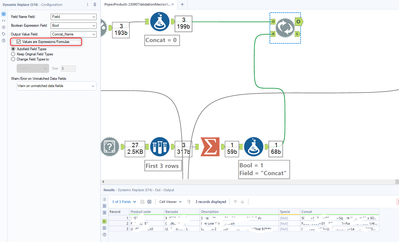
Hi @lhanson2 apologies, I only got the time now to respond. the solution of @flying008 is working. The configuration for the dynamic replace is posted on my previous comment. But I'll also attach here.

- Marcar como nuevo
- Favorito
- Suscribir
- Silenciar
- Suscribirse a un feed RSS
- Resaltar
- Imprimir
- Notificar al moderador
Another way is a RecordID, followed by a transpose (RecordID as Key Field), then summarise to concatenate, grouping on RecordID. If you want to create JSON for instance, you would need a formula to combine [Name]:[Value] etc before concatenating.
The Dynamic Replace will be much more memory efficient and so quicker runtime, but the transpose/Summarise will be easier to understand/implement

- Marcar como nuevo
- Favorito
- Suscribir
- Silenciar
- Suscribirse a un feed RSS
- Resaltar
- Imprimir
- Notificar al moderador
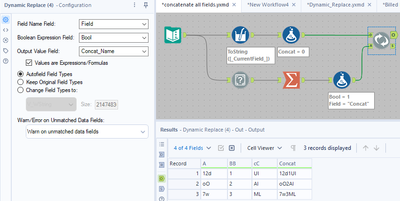
@flying008 I mirrored your work closely. I made one small modification; I added a Multi-Field tool to change all fields to strings. Thank you, that was very helpful.

- Marcar como nuevo
- Favorito
- Suscribir
- Silenciar
- Suscribirse a un feed RSS
- Resaltar
- Imprimir
- Notificar al moderador
Hi @flying008 ,
this is so helpful. do you mind to share the setup for Summarize Tool? Struggling with this, really appreciate
- Marcar como nuevo
- Favorito
- Suscribir
- Silenciar
- Suscribirse a un feed RSS
- Resaltar
- Imprimir
- Notificar al moderador
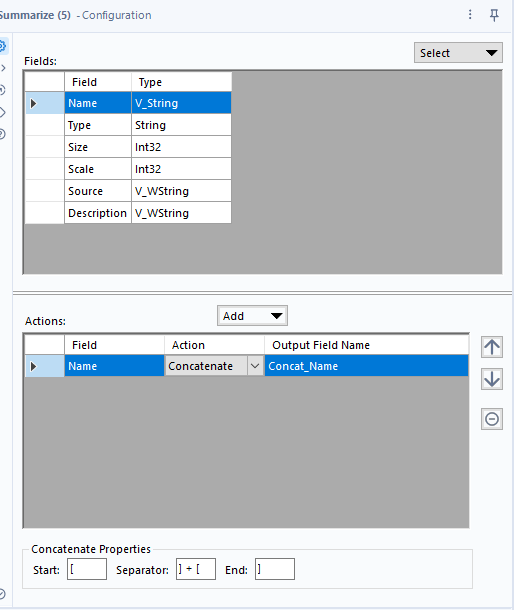
@Carrot_WinWin, you can see the config on the video on the first response or in the last comment workflow package. Attached and below is what it looks like:


- Marcar como nuevo
- Favorito
- Suscribir
- Silenciar
- Suscribirse a un feed RSS
- Resaltar
- Imprimir
- Notificar al moderador
Hi- Thanking everyone for this. This has been extremely helpful for me to concatenate columns dynamically. Having an issue with my concat_name field. It is truncating my data. I thought this would be an easy fix with a select tool before to force the name field to V_WString size 2147483647 and the Concat_Name Field in the Summarize tool still shows I have truncated fields. Any idea how to fix?
- Marcar como nuevo
- Favorito
- Suscribir
- Silenciar
- Suscribirse a un feed RSS
- Resaltar
- Imprimir
- Notificar al moderador
My data in excel for concatenating shows about 900 characters when I run a len on my concat
- Marcar como nuevo
- Favorito
- Suscribir
- Silenciar
- Suscribirse a un feed RSS
- Resaltar
- Imprimir
- Notificar al moderador
What is the data truncating to?
Is this a figure that resonates at all?
Is the result exactly the same after changing the length?
In short, truncated data should be easily found and resolved. Just got to look at where and why.
Note: Hopefully this "truncated data" thought is not referencing the results window message.

- Marcar como nuevo
- Favorito
- Suscribir
- Silenciar
- Suscribirse a un feed RSS
- Resaltar
- Imprimir
- Notificar al moderador
what is in the formulae

-
Academy
6 -
ADAPT
2 -
Adobe
204 -
Advent of Code
3 -
Alias Manager
78 -
Alteryx Copilot
26 -
Alteryx Designer
7 -
Alteryx Editions
95 -
Alteryx Practice
20 -
Amazon S3
149 -
AMP Engine
252 -
Announcement
1 -
API
1.208 -
App Builder
116 -
Apps
1.360 -
Assets | Wealth Management
1 -
Basic Creator
15 -
Batch Macro
1.559 -
Behavior Analysis
246 -
Best Practices
2.695 -
Bug
719 -
Bugs & Issues
1 -
Calgary
67 -
CASS
53 -
Chained App
268 -
Common Use Cases
3.825 -
Community
26 -
Computer Vision
86 -
Connectors
1.426 -
Conversation Starter
3 -
COVID-19
1 -
Custom Formula Function
1 -
Custom Tools
1.938 -
Data
1 -
Data Challenge
10 -
Data Investigation
3.487 -
Data Science
3 -
Database Connection
2.220 -
Datasets
5.222 -
Date Time
3.227 -
Demographic Analysis
186 -
Designer Cloud
742 -
Developer
4.372 -
Developer Tools
3.530 -
Documentation
527 -
Download
1.037 -
Dynamic Processing
2.939 -
Email
928 -
Engine
145 -
Enterprise (Edition)
1 -
Error Message
2.258 -
Events
198 -
Expression
1.868 -
Financial Services
1 -
Full Creator
2 -
Fun
2 -
Fuzzy Match
712 -
Gallery
666 -
GenAI Tools
3 -
General
2 -
Google Analytics
155 -
Help
4.708 -
In Database
966 -
Input
4.293 -
Installation
361 -
Interface Tools
1.901 -
Iterative Macro
1.094 -
Join
1.958 -
Licensing
252 -
Location Optimizer
60 -
Machine Learning
260 -
Macros
2.864 -
Marketo
12 -
Marketplace
23 -
MongoDB
82 -
Off-Topic
5 -
Optimization
751 -
Output
5.255 -
Parse
2.328 -
Power BI
228 -
Predictive Analysis
937 -
Preparation
5.169 -
Prescriptive Analytics
206 -
Professional (Edition)
4 -
Publish
257 -
Python
855 -
Qlik
39 -
Question
1 -
Questions
2 -
R Tool
476 -
Regex
2.339 -
Reporting
2.434 -
Resource
1 -
Run Command
575 -
Salesforce
277 -
Scheduler
411 -
Search Feedback
3 -
Server
630 -
Settings
935 -
Setup & Configuration
3 -
Sharepoint
627 -
Spatial Analysis
599 -
Starter (Edition)
1 -
Tableau
512 -
Tax & Audit
1 -
Text Mining
468 -
Thursday Thought
4 -
Time Series
431 -
Tips and Tricks
4.187 -
Topic of Interest
1.126 -
Transformation
3.730 -
Twitter
23 -
Udacity
84 -
Updates
1 -
Viewer
3 -
Workflow
9.980
- « Anterior
- Siguiente »