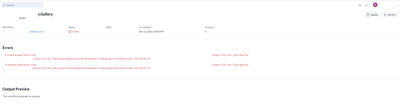
A scheduled weekly complex workflow generating multiple tabs to a single Excel workbook on a company network drive using a service account.
Process time: Should be less than 4 minutes.
Notes:
1) No I can't share the workflow. Sensitive information.
2) No I have not been able to replicate it with fake data
3) This was not a problem in version 2021
4) Things I've tried related to the workflow:
4.a) Output tool only
4.b) Block until done (Placed before Output tool)
4.c) Block unit done (Strategically placed in middle of workflow steps)
4.d) Parallel Block Until Done (Crew Macro)
4.e) Wait Time Macro
4.f) https://community.alteryx.com/t5/Alteryx-Designer-Discussions/Clear-the-output-file-before-running-a-macro-and-setting-up-an/m-p/1040648#M257628
4.g) I have tried every stack and mix of the above strategies in the gallery. Anywhere between 1-3 out of 7 total tabs will be successful. Results are not consistent.
4.h) Rebuilding the workflow in a new file is an unacceptable solution. Partially because the gallery does not permit version updates through new file overrides. Any new workflows are added as a separate workflow to the gallery and cannot be pinned to an existing workflow
4.i) Render tool - See Patch notes - TDALI-4185 DE34172 (Corrupt files - known issue)
5) There are some solutions that might work which will significantly increase the workflow processing time. I ignore these as they are not practical solutions.
6) AMP Engine is turned "Off" - Running on Version 2022.1
For designer specific functionality, option 4.f) worked flawlessly. Edit* Okay... not flawlessly... I saw this fail 12/19/2022. Uhg
For Gallery specific functionality, all options failed.
It appears as though Alteryx may have prioritized efficiency over priority in some of it's functionality. Not sure if any one ever notices some tools on their designer turning on before it's the tool's turn... (Indicated by the green box highlighting the tool. The gallery appears to have a different priority setting than the designer because my workflow succeeds when run off the designer but the same workflow fails when run in the gallery.
My opinion is the output tool should have a configurable reset when it has this specific error so that it can try again
Issue: The process cannot access the file because it is being used by another process. (32)
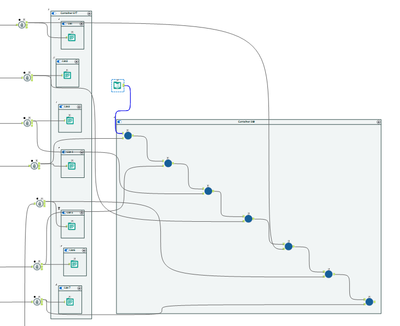
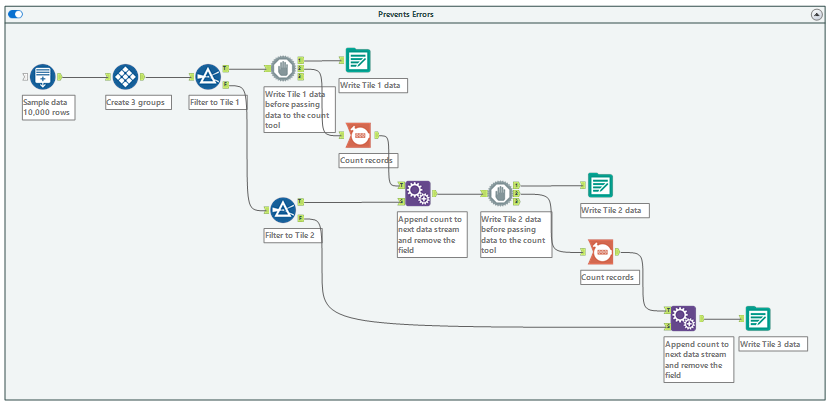
Workflow Image Below: I'm just showing two strategies here. 4.b) and 4.f) - 4.b worked in 2021 and does not work in 2022. 4.f) works in 2022 designer, but not gallery.