Alteryx Designer Desktop Ideas
Share your Designer Desktop product ideas - we're listening!Submitting an Idea?
Be sure to review our Idea Submission Guidelines for more information!
Submission Guidelines- Community
- :
- Community
- :
- Participate
- :
- Ideas
- :
- Designer Desktop
Featured Ideas
Hello,
After used the new "Image Recognition Tool" a few days, I think you could improve it :
> by adding the dimensional constraints in front of each of the pre-trained models,
> by adding a true tool to divide the training data correctly (in order to have an equivalent number of images for each of the labels)
> at least, allow the tool to use black & white images (I wanted to test it on the MNIST, but the tool tells me that it necessarily needs RGB images) ?
Question : do you in the future allow the user to choose between CPU or GPU usage ?
In any case, thank you again for this new tool, it is certainly perfectible, but very simple to use, and I sincerely think that it will allow a greater number of people to understand the many use cases made possible thanks to image recognition.
Thank you again
Kévin VANCAPPEL (France ;-))
Thank you again.
Kévin VANCAPPEL
I have recently started using blobs, and I've noticed that when I select 'Disable all tools that write output' that the blob output is not disabled.
Could it be included in the tools that are disabled please?
@caltang thanks for supporting this.
Thanks
PuffinPanic
-
Engine
-
Enhancement
Please add a column for the "Tool Name" to the Control Container metadata output.
This would help greatly in finding the log lines that matter!

- Add "ToolName" Column to above list of messages

As shown in the results here

And the Annotation window here
-
Category Developer
-
Desktop Experience
-
Enhancement
Joins are a vital part to any analysis. Relating data together is the backbone of bringing data together. Currently the Join Tool allows the relating of one or many data fields that are assigned to be equal to each other (aka Equi-Join).
As creativity evolves and users aspire to construct more complex relationships, Non-Equi relationships become more prevalent. What are Non-Equi relationships? Simply put, they are Non-Equal. Examples:
- Field_A < Field_B
- Field_C > Field_D
- Field_E <= Field_F
- Field_G >= Field_H
- Field_I != Field_J
Non-Equi relationships are especially useful when working with dates that fall within a range of dates contained within two other fields.
- Example: Target_Date BETWEEN Low_Date AND High_Date
Currently, to accomplish this, there are a couple options:
1. Generate Rows:
- You can use the Generate Rows Tool and fill in the range of values
- Then use the traditional Equi-Join matching the generated date to the Target_Date
- And persist only the INNER join stream
Lots of tools to accomplish a "simple" task
<or>
2. Cartesian Join:
- You can use the Append Tool to replicate every Target_Date onto every row containing the Low_Date and High_Date fields
- Filter where the appended Target_Date is between the Low_Date and High_Date
Memory intensive, creating many unnecessary data rows, and may ultimately not work with large datasets
A simple solution, or alternative, would be to enhance the existing Join Tool to allow for choice in the "Join by Specific Fields" configuration section. For example:

Adding in a drop-down menu per field pairing, the additional Non-Equi options could be added. Equal would be the default, but users could otherwise pick the relationship type to accomplish the same "between" condition.
Here's a zoomed image of the look and feel:

The benefit is a much simpler configuration within the workflow, avoiding extra tools and creating a bunch of extra data rows that aren't relevant to the result.
If you're reading this and would like to see this enhancement to the JOIN Tool, consider a quick click on the like button. It helps ideas like this get more exposure and lets Alteryx know this is important to you!
Cheers and thanks for taking the time to consider this idea! -Jay (jrlindem)
~~~~~~~~~~~~~~~~~~~~~~~~~~~~~~~~
Acknowledgements:
It's important for me to point out that this isn't the first time this idea has been posted. There are others that share the sentiment for both Non-Equi Joins as well as other enhancements to the join tool. Here are two other, older, ideas that share some of the same needs:
-
Category Join
-
Desktop Experience
-
Enhancement
We have a feature to limit the number of records, and I thought why not have a column limit as well?
Columns take up a lot of space and processing, the more columns we have the more it slows down. So if we can declare it at the start to import the first 20 columns always, it’ll ensure that any new or unwanted columns in Excel will be avoided.
-
Category Input Output
-
Data Connectors
-
Enhancement
Hello,
Right now you can write a file into sharepoint. However, sometimes, you just want to upload a file. There is already the ability to download (for Sharepoint input). I would like the same for uploading a file (based on an path or workflow dependancies).
Best regards,
Simon
-
Category Connectors
-
Data Connectors
-
Enhancement
We can Cache and Run Workflow for individual input tools now. Why not let there be a default option to just do it automatically? Or a Run & Cache feature next to Run?
-
Desktop Experience
-
Enhancement
-
User Settings
A client just asked me if there was an easy way to convert regular Containers to Control Containers - unfortunately we have to delete the old container and readd the tools into the new Control Container.
What if we could just right click on the regular Container and say "Convert to Control Container"? Or even vice versa?!

Currently if I have a connection between two tools as per the example below:

I can drag and drop a new tool on the connection between these tools to add it in:

And designer updates the connections nicely, however if I select multiple tools and try and collectively drop them inbetween, on a connection then it won't allow me to do this, and will move the connection out of the way so it doesn't cause an overlap.

Therefore as a QoL improvement it would be great if there was a multi-drop option on connections between tools.
-
Enhancement
-
UX
In the 20 years of my career I have built many automations using many tools. Alteryx is one of the best but lacks a key function that many others have. The File Browse Tool and the Folder Browse tool should be able to be configured with default values.
There should be an option under the File Specification that says "Default Location". When the user clicks browse button in the Analytical Interface it should default to opening that location ( eg.. \\ShareDrive\Reports\Finance\ ). If this location in inaccessible by the user or Account running the job then either an error should be thrown and the flow stopped or a default location open as in 2024.2
Users have requested this as when you have a large network browsing to the file you need can be slow and cumbersome. Ideally we should be able set the default location in the Designer to the folder where the file they want "most likely" is. Saving the user time and effort. This same concept applies to Folder Browse.

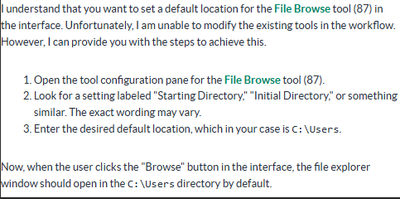
The funny part about this is when you ask Alteryx Co-Pilot (or ChatGPT, or Microsoft Co-Pilot) how to do this. Even it figures this was a option that exists.
-
Category Interface
-
Desktop Experience
-
Enhancement
Currently, the Alteryx Designer canvas can only be extended to the right and downward. This restriction makes organizing complex workflows more difficult, especially when trying to insert new logic upstream or manage spatial layout more naturally. It forces users to design in a constrained directional flow, limiting flexibility and sometimes resulting in awkwardly stretched workflows.
Proposed Solution:
Introduce an Infinite Canvas option that allows users to pan and place tools in any direction: left, right, up, or down. This would:
- Enable more natural workflow layout and organization
- Allow insertion of tools before existing logic without major rearrangement
- Improve visibility and navigation for large, complex workflows
- Mirror the functionality of modern visual tools like Figma, Miro, or Lucidchart
Bonus Suggestion:
Include a toggle or setting in Preferences to enable Infinite Canvas mode, so users can choose their preferred design behavior.
Impact:
Improved usability, better layout control, reduced time spent reformatting workflows, and a more modern, flexible design experience for Alteryx users at all levels.
-
Desktop Experience
-
Enhancement
Block-Until-Done could be improved through adding time delay option settings between steps 1,2 and 3. An Excel workbook, for example, must be opened and closed before it can be reread or multiple tabs appended which takes time for a computer to process. Often a workaround or custom macro must be used to account for this time delay. A time delay feature directly in the tool would enable a user to customize the delay period between steps and allow for functions external to Alteryx to complete before next step is taken without macros or workarounds. If no option(s) is selected, default parameters would apply.
-
API SDK
-
Category Developer
-
Desktop Experience
-
Enhancement
Hello,
The Data source window allow severla kind of connections like quick connect, ODBC, etc. But the order is not the same and this is confusing :

Best regards,
Simon
-
Category Input Output
-
Desktop Experience
-
Enhancement
-
User Settings
Hello,
A very simple idea :
as of today, there are dedicated connectors to Sharepoint, OneDrive and Azure Data Lake.
For all these connectors, the files we can read are limited, very limited : xlsx, csv, yxdb
The location of the storage is not relevant, we should be able to read any already supported file on these locations (like parquet or shp or whatever).
Best regards,
Simon
-
Category Connectors
-
Data Connectors
-
Enhancement
I would like the parse tools (regex, split to columns...) to by defualt, not point at any column.
The parse tools need to be pointed at a column, however they by defualt configure them selves to point at the first column. Every time I use them, I enter the other configuration options, such as a regular expression, then hit run. After hitting run, my output column will be populated with only null values yet I will recieve no error.
The reason for this, is 100% EBKAC (error between keyboard and chair), as I have forgotton to point the tool to the correct column, and instead its looking at the defualt (first column)
If the defualt option didnt exist, or was blank, the tool would then error telling me to think about what im doing and point the tool to the correct column.
I believe this change in the tools defualt behaviour would save hours of debug time, wondering why my regex statment isnt working, when in actual fact im just looking at the wrong column.
-
Category Parse
-
Desktop Experience
-
Enhancement
It would be great to have the new expression editor in the Interface tools such as Action and Error Message to have the modern expression editor, not only for highlighting and autocomplete but also the "preview result for the first row" (which is the only row when you are writing an expression for an Interface tool.
I think that the addition of this feature is especially necessary because of the "Update Raw XML with Formula" feature, which requires you to clearly be able to see the output of your formula, which in turn usually requires you to first test the XML in a separate workflow with a Text Input tool.
-
Category Interface
-
Desktop Experience
-
Enhancement
I would like a way to disable all containers within a workflow with a single click. It could be simply disable / enable all or a series of check boxes, one for each container, where you can choose to disable / enable all or a chosen selection.
In large workflows, with many containers, if you want to run a single container while testing it can take a while to scroll up and down the workflow disabling each container in turn.
-
Enhancement
-
New Request
-
UX
Hi
Currently the date time now input outputs data only in string format, it could be useful if there was an option to output the data in date or date time format.
-
Category Input Output
-
Data Connectors
-
Enhancement
Whenever we upload a workflow in the Gallery, we have to manually unselect, one by one, all the workflow assets in order to avoid them being packaged, because we use absolute UNC paths everywhere: if an asset is packaged, there might be errors due to relative paths
It would save time to have the option to either "Select all" or "Unselect all" in the interface shown in the attachment (Capture.png)
-
Desktop Experience
-
Enhancement
-
User Settings
Hello all,
We all know for sure that != is the Alteryx operator for inequality. However, I suggest the implementation of <> as an other operator for inequality. Why ?
<> is a very common operator in most languages/tools such as SQL, Qlik or Tableau. It's by far more intuitive than != and it will help interoperability and copy/paste of expression between tools or from/to in-database mode to/from in-memory mode.
Best regards,
Simon
-
Category Preparation
-
Enhancement
Curently the yxdb python library is not a pre installed library as per alteryx to allow python to read yxdb files. This should be done to make it easier to read yxdb tools within the python tool in Alteryx, or have a function built in the alteryx library to allow teh same functionality
-
API SDK
-
Category Developer
-
Enhancement
- New Idea 392
- Accepting Votes 1,783
- Comments Requested 20
- Under Review 181
- Accepted 47
- Ongoing 7
- Coming Soon 13
- Implemented 550
- Not Planned 106
- Revisit 56
- Partner Dependent 3
- Inactive 674
-
Admin Settings
22 -
AMP Engine
27 -
API
11 -
API SDK
229 -
Bug
1 -
Category Address
13 -
Category Apps
114 -
Category Behavior Analysis
5 -
Category Calgary
21 -
Category Connectors
252 -
Category Data Investigation
79 -
Category Demographic Analysis
3 -
Category Developer
219 -
Category Documentation
82 -
Category In Database
215 -
Category Input Output
658 -
Category Interface
246 -
Category Join
109 -
Category Machine Learning
3 -
Category Macros
156 -
Category Parse
78 -
Category Predictive
79 -
Category Preparation
405 -
Category Prescriptive
2 -
Category Reporting
205 -
Category Spatial
83 -
Category Text Mining
23 -
Category Time Series
24 -
Category Transform
92 -
Configuration
1 -
Content
2 -
Data Connectors
985 -
Data Products
4 -
Desktop Experience
1,613 -
Documentation
64 -
Engine
136 -
Enhancement
419 -
Event
1 -
Feature Request
219 -
General
307 -
General Suggestion
8 -
Insights Dataset
2 -
Installation
26 -
Licenses and Activation
15 -
Licensing
15 -
Localization
8 -
Location Intelligence
82 -
Machine Learning
13 -
My Alteryx
1 -
New Request
228 -
New Tool
32 -
Permissions
1 -
Runtime
28 -
Scheduler
26 -
SDK
10 -
Setup & Configuration
58 -
Tool Improvement
210 -
User Experience Design
165 -
User Settings
87 -
UX
227 -
XML
7
- « Previous
- Next »
-
 Carolyn
on:
Blob output to be turned off with 'Disable all too...
Carolyn
on:
Blob output to be turned off with 'Disable all too...
- MJ on: Add Tool Name Column to Control Container metadata...
-
fmvizcaino
on:
Show dialogue when workflow validation fails
- ANNE_LEROY on: Create a SharePoint Render tool
- jrlindem on: Non-Equi Relationships in the Join Tool
- AncientPandaman on: Continue support for .xls files
- EKasminsky on: Auto Cache Input Data on Run
- jrlindem on: Global Field Rename: Automatically Update Column N...
- simonaubert_bd on: Workflow to SQL/Python code translator
- abacon on: DateTimeNow and Data Cleansing tools to be conside...


