Hi Team,
Here I am going to demonstrate, Alteryx workflow allows dynamic calculations based on an external file. Users can update, add, or remove formulas in that file, and the workflow adjusts automatically—no changes needed from the developer.
Assume we have a data source structured as follows
Data Table:

The calculations are defined in a separate source file, allowing users to update them at any time without modifying the workflow
Formula Table:

The expected output is as follows:

We can generate the expected output by leveraging the Dynamic Replace tool to apply calculations dynamically.
Here is the flow
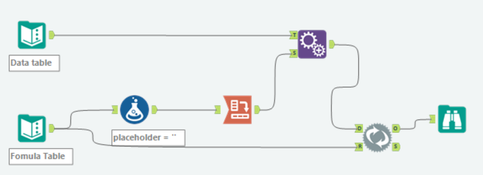
- Use the Cross Tab tool to pivot the data from formula table and create headers for different calculation types.
- Apply the Formula tool to fill in any blank values for those calculation types.
- Append the resulting table to the main data table.
- Use the Dynamic Replace tool to perform the calculations dynamically based on the updated data.
Configuration for those tools:
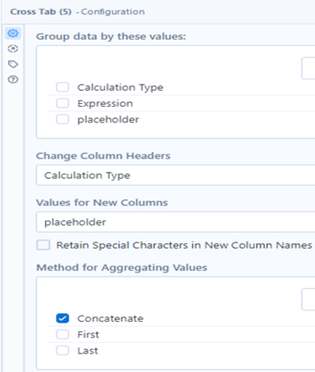
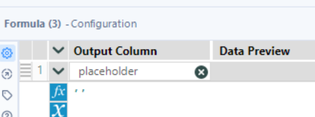
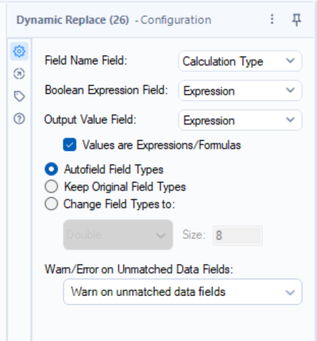
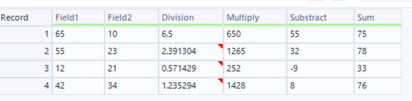
After executing the workflow, the following result will be produced
Now if the calculations are updated as follows,
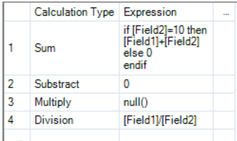
Then the output will come as below
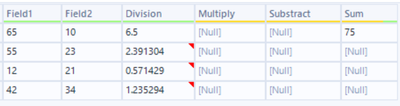
The result is successfully updated; however, if any expression is defined as '0' or includes a condition that results in '0', the final output for that expression will appear as null.
Explanation:
Since the Dynamic Replace tool is configured to use the 'Expression' field as the Boolean Expression Field, any calculation that evaluates to 0 is treated as false. As a result, the Dynamic Replace tool returns null for such expressions, even if 0 is the expected output.
Solution:
To ensure that 0 values are correctly retained, add a Formula tool before the Dynamic Replace. Create a new field that always evaluates to a non-zero value (for example, 1). Then, use this new field as the Boolean Expression Field in the Dynamic Replace tool. This will ensure that all expressions, including those resulting in 0, are properly evaluated and applied.
Updated workflow will be as below:
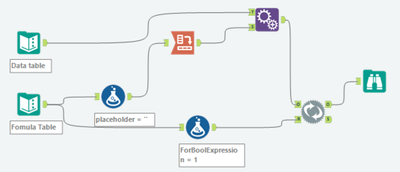
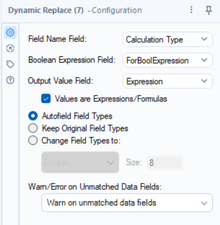
Now the output will come as expected,
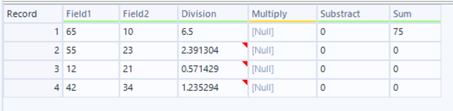
This approach allows us to dynamically add or update calculations in the workflow without modifying the workflow itself. However, there are a few important considerations to ensure it functions correctly:
- Expression Syntax must follow Alteryx's formula syntax exactly.
- Field Names should not contain spaces. Use underscores or rename fields as needed.
- Blank Field Names or Expressions will result in errors during execution and must be avoided.
Please try and share your feedback as well. Thank you. Happy learning


