
1. Challenge: SAP can store attachments in any of the SAP supported MIME type formats including texts, images, audio, video and applications including PDF, MS Word, MS Excel, MS Powerpoint etc to a variety of transactions such as purchase orders, sales orders, invoices etc. Business users would like to automate the download these documents for further analysis and packaging.
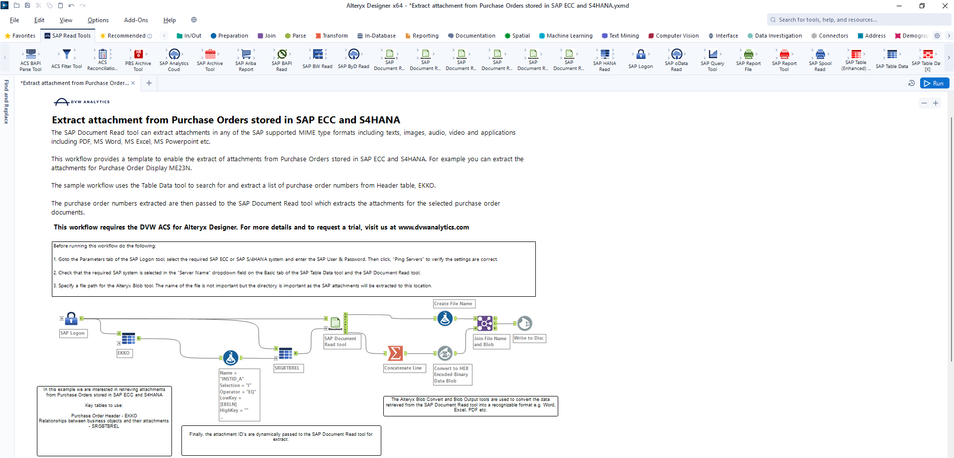
2. Solution: The SAP Document Read tool can extract attachments in any of the SAP supported MIME type formats including texts, images, audio, video and applications including PDF, MS Word, MS Excel, MS Powerpoint etc.This workflow from DVW Analytics uses the Alteryx Connector for SAP (ACS) to demonstrate how to extract attachments from Purchase Orders stored in SAP ECC and S4HANA. For example you can extract the attachments for Purchase Order Display ME23N.
The sample workflow uses the Table Data tool to search for and extract a list of purchase order numbers from Header table, EKKO. The purchase order numbers extracted are then passed to the SAP Document Read tool which extracts the attachments for the selected purchase order documents.
- Works with: SAP ECC, SAP S/4HANASAP Read
- Tools used: SAP Table Data tool, SAP Document Read tool
3. Value: The SAP document read tool can eliminate the need to manually download SAP attachments and save time and reduce potential human errors.


