The Alteryx Community is a finalist in three 2026 CMX Awards! Help us win Customer Support Community, Most Engaged Community, and User Group Program of the Year - vote now! (it only takes about 2 minutes) before January 9.
ACT NOW: The Alteryx team will be retiring support for Community account recovery and Community email-change requests Early 2026. Make sure to check your account preferences in my.alteryx.com to make sure you have filled out your security questions. Learn more here
Start Free Trial

Alteryx Server Discussions

Find answers, ask questions, and share expertise about Alteryx Server.

Analytics App Output No Longer Available on Gallery

edw_bi_ziply
5 - Atom

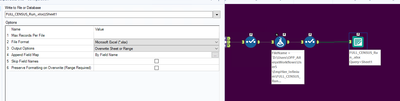
We upgraded our Alteryx Server to 2022.1.1.30961 last Monday. We had to apply a new password to an Analytics App input and reload it to our gallery on Tuesday. These two activities were unrelated and are likely coincidental. After uploading the reconfigured app to the server it is no longer providing the excel download for the output that it was providing previously. The output tool was not changed, nor were the Workflow settings.


I have scoured the internet and I can't find any cases of this same scenario OR a straightforward "how to set up an output from gallery". I'm looking for ideas, documentation, or really anything helpful. Is there a how-to out there? It's entirely possible I am using the wrong search terms. Any assistance is appreciated! 
 

edw_bi_ziply_1-1662693426812.png


Thanks in advance


1 REPLY 1
DataNath
17 - Castor
17 - Castor

@edw_bi_ziply within the ‘Write to File or Database’ part of the configuration, you’re only providing a file & sheet name and there’s no location defined for Alteryx to save to so I think you need to reconfigure that part, unless I’m missing something else.