Hi everyone,
I hope someone can help me with an issue regarding deploying a workflow on the Alteryx Gallery.
I've developed a workflow and successfully uploaded it to our Alteryx Gallery. This workflow requires an Excel file as input, which the user should select interactively via a File Browse Tool.
To achieve this, I've used the following configuration:
- An Input Data Tool is connected to a sample Excel file and reads a specific sheet (e.g., "Sheet1" or "Data").
- A File Browse Tool allows the user to select the Excel input file.
- An Action Tool connects the File Browse Tool to the Input Data Tool to dynamically update the Excel file path
Every time a user runs the workflow in the Gallery and selects an Excel file, a pop-up window appears, prompting the user to select the Excel sheet.
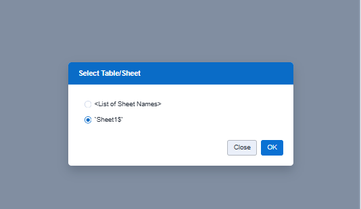
I do not want to have the option of selecting "<List of Sheet Names>". I only want to be able to select the Sheet itself.
Is there a specific setting or another method to suppress this behavior in the Alteryx Gallery? Do I need to use a different tool or make
different configuration?
Thank you in advance for your help!
Best regards, Felix


