
Note: The Date Filter tool was deprecated in Alteryx Designer version 2018.1 - its functionality was added to the Filter tool.
This article is part of the Tool Mastery Series, a compilation of Knowledge Base contributions to introduce diverse working examples for Designer Tools. Here we’ll delve into uses of the Date Filter Tool on our way to mastering the Alteryx Designer:
The Date Filter tool is a very tailored version of the Filter tool with an enhanced GUI for date picking.
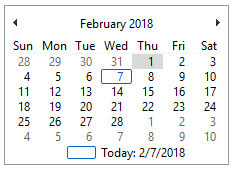
The date picking GUI will always have today’s date outlined in blue and the selected date highlighted in grey. The GUI below should show that I am writing this on February 7th, 2018 and have selected February 1st, 2018.
The Date Filter tool filters data by 3 possible criteria:
- Between a Start Date and End Date
- Number of periods after a Start Date
- Number of periods before an End Date
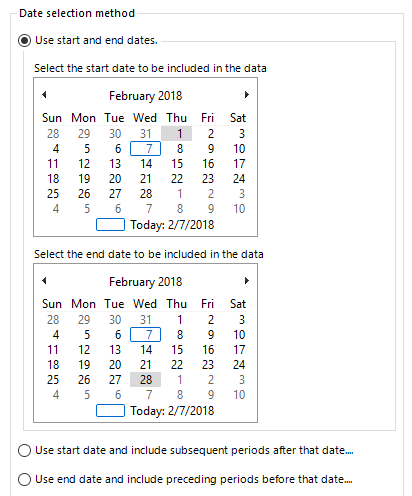
- To filter data between a Start Date and End Date, select the first option in the configuration window.
The Start Date is selected from the GUI on top while the End Date is selected from the GUI on bottom. The GUI below should show a date range between February 1st, 2018 through February 28th, 2018.
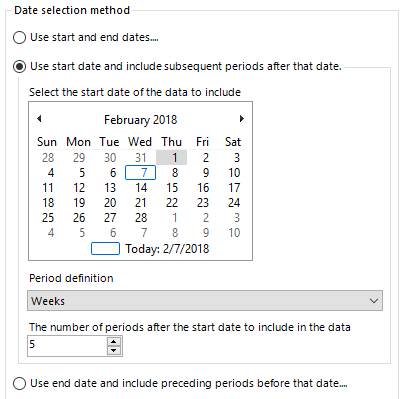
- To filter data after a number of periods after a Start Date, select the second option in the configuration window.
After selecting the Start Date, define the type and number of periods to include in the data after the Start Date. Periods can be any of the following: days, weeks, months, quarters, or years. The GUI below should include all data 5 weeks after February 1st, 2018.
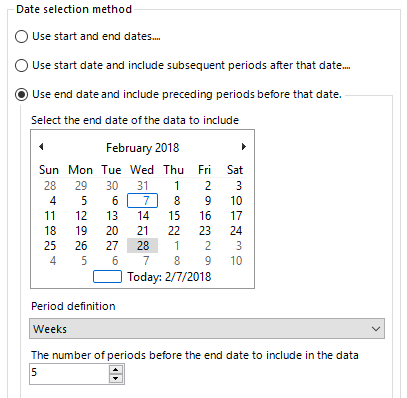
- To filter for data before an End Date, select the third option in the configuration window.
After selecting the End Date, define the type and number of periods to include in the data before the End Date. Periods can be any of the following: days, weeks, months, quarters, or years. The GUI below should include all data 5 weeks before February 28th, 2018.
While the Date Filter tool can used be for simple filters over exact date ranges, the Filter tool must be used for more complex date filters.
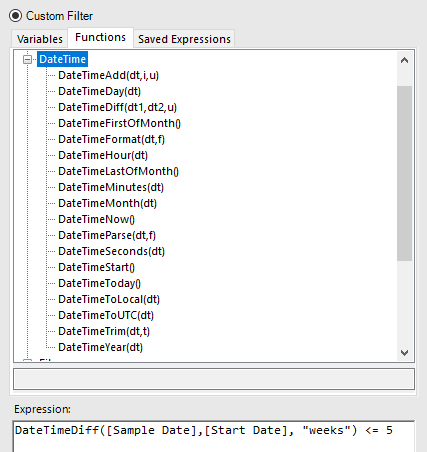
Complex date filters will use the Filter tool and DateTime Functions. A date filter could be complex because it uses another variable, is an irregular set of dates, or many other situations where the dates or periods aren’t fixed. The below example filters for data where the [Sample Date] is within 5 weeks of the [Start Date] which is set by a variable.
Find the Tool Mastery post for the Filter tool here!
By now, you should have expert-level proficiency with the Date Filter Tool! If you can think of a use case we left out, feel free to use the comments section below! Consider yourself a Tool Master already? Let us know at community@alteryx.com if you’d like your creative tool uses to be featured in the Tool Mastery Series.
Stay tuned with our latest posts every Tool Tuesday by following Alteryx on Twitter! If you want to master all the Designer tools, consider subscribing for email notifications.


