Alteryx Designer Desktop Discussions
Find answers, ask questions, and share expertise about Alteryx Designer Desktop and Intelligence Suite.- Community
- :
- Community
- :
- Participate
- :
- Discussions
- :
- Designer Desktop
- :
- POST request using Alteryx (works with Postman, no...
POST request using Alteryx (works with Postman, not with Alteryx) to Vtiger
- Suscribirse a un feed RSS
- Marcar tema como nuevo
- Marcar tema como leído
- Flotar este Tema para el usuario actual
- Favorito
- Suscribir
- Silenciar
- Página de impresión sencilla

- Marcar como nuevo
- Favorito
- Suscribir
- Silenciar
- Suscribirse a un feed RSS
- Resaltar
- Imprimir
- Notificar al moderador
Hello all,
I have been trying to make a POST request using Alteryx and connecting it to Vtiger.
In order to succesfully connect to Vtiger the following needs to happen:
- Get a challenge token and create an accessKey
- Using that accessKey to login.
I have been able to generate an accesKey using Alteryx (and the GET command for the challenge token). However I am stuck on the POST request. Here is what I am doing in Postman:
Postman Header:

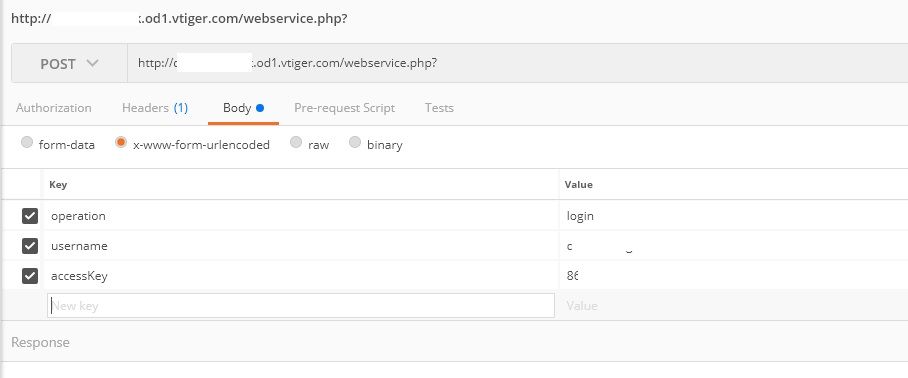
Postman Body:
In the header the content-type needs to be defined
In the body the operation, username and accessKey needs to be defined.
In Postman using the full URL with the body doesn't work:
Now here is what I did in Alteryx
URL: Same as you see in the postman request and encoding it.
Alteryx Headers:

Alteryx Body:
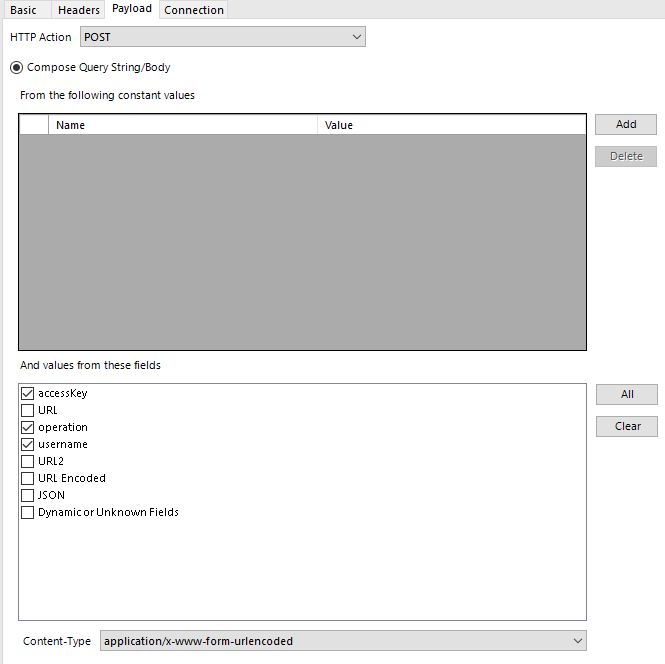
Using this I get a blank response on download data. The response is:
HTTP/1.1 302 Found
Date: Wed, 15 Nov 2017 14:58:17 GMT
Server: Apache
Location: https://yourwebsite.od1.vtiger.com/webservice.php?
Cache-Control: max-age=2592000
Expires: Fri, 15 Dec 2017 14:58:17 GMT
Content-Length: 235
Content-Type: text/html; charset=iso-8859-1
HTTP/1.0 500 Internal Server Error
Date: Wed, 15 Nov 2017 14:58:17 GMT
Server: Apache
Strict-Transport-Security: max-age=15768000
Cache-Control: max-age=2592000
Expires: Fri, 15 Dec 2017 14:58:17 GMT
Content-Length: 0
Connection: close
Content-Type: text/html
However. If I use the full URL (http://yourwebsite.od1.vtiger.com/webservice.php?operation=login&username=username123@yoursite.com&accessKey=key12345) Instead of the URL just ending in "webservice.php?" I do get a response with invalid credentials (the same response Postman will give if you try to use the full URL).
Can anyone spot an error or help me in the right direction? I have tried several solutions but can't get the POST request to work properly. What I do see in the response above is that the Content-Type is set as text/html while I have specified it as application/x-www-form-urlencoded
Solutions I have tried:
- Generating a JSON and adding this as the body
- Manually specifying the body credentials using the "add" function
Kind regards,
¡Resuelto! Ir a solución.
- Etiquetas:
-
API
-
Connectors
-
Download


- Marcar como nuevo
- Favorito
- Suscribir
- Silenciar
- Suscribirse a un feed RSS
- Resaltar
- Imprimir
- Notificar al moderador
I’m not familiar with connecting to that service specifically, but looking at their documentation, you may be missing a step When constructing your “accessKey” parameter value. After you concatenated your TOKENSTRING and access key, did hash it with MD5? Alteryx does have 2 md5 functions that you can try.
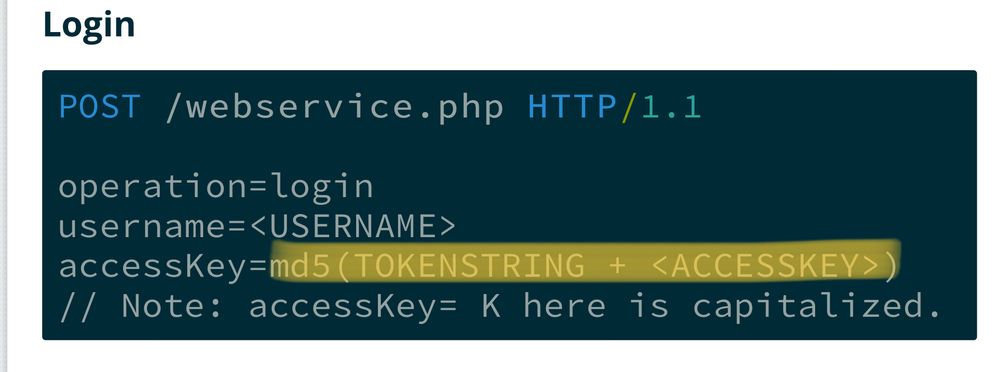
If that doesn’t solve it, I’d recommend downloading/installing Fiddler to see what Alteryx is actually sending to the API.
Hope this helps!
Jimmy
- Marcar como nuevo
- Favorito
- Suscribir
- Silenciar
- Suscribirse a un feed RSS
- Resaltar
- Imprimir
- Notificar al moderador
Hi @jrgo
Thanks for your reply. In the first part of the workflow I automated the Token + MD5 function.
I have tested both MD5 functions and MD5_ASCII([Challenge Token]+[Access Key]) was the correct one.
In order to really know if the accessKey works I have copied it from Alteryx and pasted it in Postman which produces a good response.
Either today or tomorrow I will get some help from a developer within our company. Should we get it working i'll post the results here.
- Marcar como nuevo
- Favorito
- Suscribir
- Silenciar
- Suscribirse a un feed RSS
- Resaltar
- Imprimir
- Notificar al moderador
Solution was found.
Turns out I had a http request set but I needed to make it a https request.
A small but often overlooked mistake. Thanks for the help!

- Marcar como nuevo
- Favorito
- Suscribir
- Silenciar
- Suscribirse a un feed RSS
- Resaltar
- Imprimir
- Notificar al moderador
I was getting the same error. I had imported the table using lower case. I re-imported the table with upper case and it worked.

- Marcar como nuevo
- Favorito
- Suscribir
- Silenciar
- Suscribirse a un feed RSS
- Resaltar
- Imprimir
- Notificar al moderador
does anyone know if it is possible to force the content-type to application/json in the download tool, while making a post call?

- Marcar como nuevo
- Favorito
- Suscribir
- Silenciar
- Suscribirse a un feed RSS
- Resaltar
- Imprimir
- Notificar al moderador


-
Academy
6 -
ADAPT
2 -
Adobe
204 -
Advent of Code
3 -
Alias Manager
78 -
Alteryx Copilot
26 -
Alteryx Designer
7 -
Alteryx Editions
95 -
Alteryx Practice
20 -
Amazon S3
149 -
AMP Engine
252 -
Announcement
1 -
API
1.210 -
App Builder
116 -
Apps
1.360 -
Assets | Wealth Management
1 -
Basic Creator
15 -
Batch Macro
1.559 -
Behavior Analysis
246 -
Best Practices
2.696 -
Bug
720 -
Bugs & Issues
1 -
Calgary
67 -
CASS
53 -
Chained App
268 -
Common Use Cases
3.825 -
Community
26 -
Computer Vision
86 -
Connectors
1.426 -
Conversation Starter
3 -
COVID-19
1 -
Custom Formula Function
1 -
Custom Tools
1.939 -
Data
1 -
Data Challenge
10 -
Data Investigation
3.489 -
Data Science
3 -
Database Connection
2.221 -
Datasets
5.223 -
Date Time
3.229 -
Demographic Analysis
186 -
Designer Cloud
743 -
Developer
4.376 -
Developer Tools
3.534 -
Documentation
528 -
Download
1.038 -
Dynamic Processing
2.941 -
Email
929 -
Engine
145 -
Enterprise (Edition)
1 -
Error Message
2.262 -
Events
198 -
Expression
1.868 -
Financial Services
1 -
Full Creator
2 -
Fun
2 -
Fuzzy Match
714 -
Gallery
666 -
GenAI Tools
3 -
General
2 -
Google Analytics
155 -
Help
4.711 -
In Database
966 -
Input
4.296 -
Installation
361 -
Interface Tools
1.902 -
Iterative Macro
1.095 -
Join
1.960 -
Licensing
252 -
Location Optimizer
60 -
Machine Learning
260 -
Macros
2.866 -
Marketo
12 -
Marketplace
23 -
MongoDB
82 -
Off-Topic
5 -
Optimization
751 -
Output
5.259 -
Parse
2.328 -
Power BI
228 -
Predictive Analysis
937 -
Preparation
5.171 -
Prescriptive Analytics
206 -
Professional (Edition)
4 -
Publish
257 -
Python
855 -
Qlik
39 -
Question
1 -
Questions
2 -
R Tool
476 -
Regex
2.339 -
Reporting
2.434 -
Resource
1 -
Run Command
576 -
Salesforce
277 -
Scheduler
411 -
Search Feedback
3 -
Server
631 -
Settings
936 -
Setup & Configuration
3 -
Sharepoint
628 -
Spatial Analysis
599 -
Starter (Edition)
1 -
Tableau
512 -
Tax & Audit
1 -
Text Mining
468 -
Thursday Thought
4 -
Time Series
432 -
Tips and Tricks
4.187 -
Topic of Interest
1.126 -
Transformation
3.732 -
Twitter
23 -
Udacity
84 -
Updates
1 -
Viewer
3 -
Workflow
9.983
- « Anterior
- Siguiente »


