It would be nice if we can arrange some tools on the canvas neatly by one click and having them distributed evenly (horizontally/vertically).
See this picture which worth thousand words.
Alignment options would be nice as well to clean things up.
@mcarrico, there are keyboard shortcuts for alignment.
To align selected tools horizontally, press Ctrl+Shift+ -
To align selected tools veritcally, press Ctrl+Shift+ +
Oh wow, thanks for letting me know. Never saw it in a ribbon or from the right click menu, but the keyboard shortcut is even better. Thanks so much!
As khaiwong pointed out, there are hot keys for doing this, but I only recently learned about them. It would be nice to add this to the "right click" context menu.
Somewhat Tangentially how about an Alteryx Beautifier! One click beautfication of either selected items or the whole workflow.
* Avoids spaghetti beziers
* aligns to grid other tools along the path
* distributes evenly
* might scales the workflow with all inputs at the top (vertically) or left (horizontally) and cascade through the workflow
This is a great idea; a distribute horizontal tool would save me a lot of time.
Agreed with the distribute and context menu.
We like to neaten workflows up to be able to print for documentation creation (along with lots of comments and annotations!)
this would be a good complement to the align horizontally / vertically that was shipped in 11!
SAS EG and Visio both have auto-arrange features that resemble the functionality described, namely not only aligning tools on the canvas, but distributing them, as well as pin/snap-in options.
Would be interested in hearing whether Alteryx has any plans to build this out.
There are a couple of ideas in this post.
First, aligning tools vertically or horizontally (without using the keyboard shortcuts). This is now available!
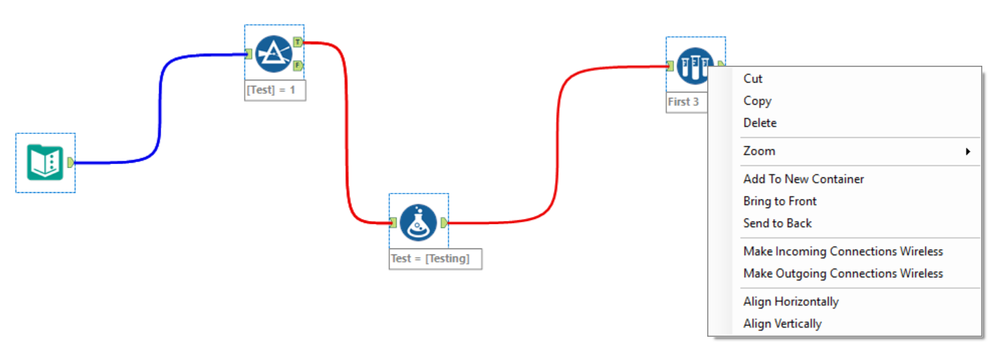
Align Menu Options
Second, distributing the tools evenly. @Inactive User demonstrated this in an image in the original post. If you are interested in the even distribution of tools, I'm curious about the canvas user settings you currently use. Do you use snap to grid? Do you show the grid?
Cool idea! You all have no idea how many hours I spend aligning tools into the perfect grid.
I have to admit that part of the reason this feature's important to me is I'm a perfectionist / neat freak. I feel like I can't be the only one given one of the main uses of Alteryx is to clean and prep data for analysis, which seems like it would lend itself to the obsessive types. Or maybe it's me...
Thanks so much for your feedback. I'm happy to say that this will be shipping in our release this summer.
@RachelW
It's great that Alteryx has align vertical/horizontal, but has there been any progress made to include distribute vertical/horizontal?
Thanks!
Michael
@iamfainny Pretty sure on another thread somewhere on the Community I read this feature was getting released sometime of the first half of this year. Sorry I don't have the link handy.
@iamfainny Yes. You'll see it in the release this summer.
@Brad2 You read that it is coming in this thread. It's completed and in testing before release.
@RachelW Is there a badge I can earn for least helpful comment on the forum? Maybe a dunce cap?
@Brad2 There might be a badge, but you definitely don't need it! Thanks for jumping in and responding!
@RachelW @Brad2 thank you!! Looking forward to it as my OCD is getting in the way.
This is now available in the 2018.2 release. You now have the ability to align tools and distribute evenly. Check it out!
I see alignment function, but not the "distribute evenly" function. Latter one launched? searched for setting pages and couldn't figure out :S
Here's what I see when I right-click on Canvas with multiple tools selected. (Admin Designer Ver:2018.1.3.42973)
@MY This feature was shipped in 2018.2. It looks like you are on version 2018.1.
I like the Distribute Horizontally and Vertically right-click menu options that I now have in Alteryx 2018.4
Is there a hotkey for 'Distribute Horizontally' and 'Distribute Vertically'?