Hello,
I have 4 files (Classroom A.xlsx, Classroom B.xlsx, Classroom C.xlsx, Classroom D.xlsx) with similar Sheet name and column headers, but the first and last column have a different Type in each file (some are V_String and others are Double). Therefore, when I use the Wildcard function to input all at once, only 2 of the 4 files get loaded. The other 2 get a "different schema" error and are skipped.
Goal: I want all 4 files to load and I want the first and last column to read as V_String for all 4 files.
While this example is only using 4 files, my actual dataset contains 100+ files so my understanding from reading other posts is I should use a Batch Macro. I dragged the Control Parameter tool onto my canvas and linked it to my Input Tool, then I need help with the next steps.
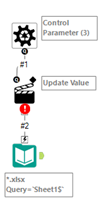
Q1: In the Interface Designer Mode, what should I select under "Select an action type:"?

Q2: What should I do after selecting "Auto Configure by Name (Wait Until All Iterations Run)"? [If that's in fact the right setting to choose]
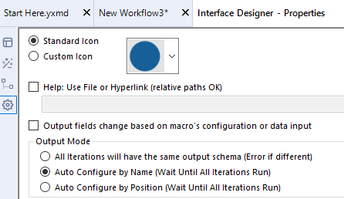
Q3: I need step by step guidance from there (I am confused how to actually apply the macro to the input tool and get the desired output). Screenshots much appreciated, thank you!


