ACT NOW: The Alteryx team will be retiring support for Community account recovery and Community email-change requests Early 2026. Make sure to check your account preferences in my.alteryx.com to make sure you have filled out your security questions. Learn more here
Start Free Trial

Alteryx Designer Desktop Discussions

Find answers, ask questions, and share expertise about Alteryx Designer Desktop and Intelligence Suite.
RESUELTAS

need HELP, double to date format

DanielShen
Átomo

Hi


I went into a trouble for converting numbers (doulbe format) to date format in Alteryx.


e.g. numbers in excel 20230722, how to convert to date format as 22/07/2023  in Alteryx, thanks!


3 RESPUESTAS 3
geraldo
Púlsar

@DanielShen 


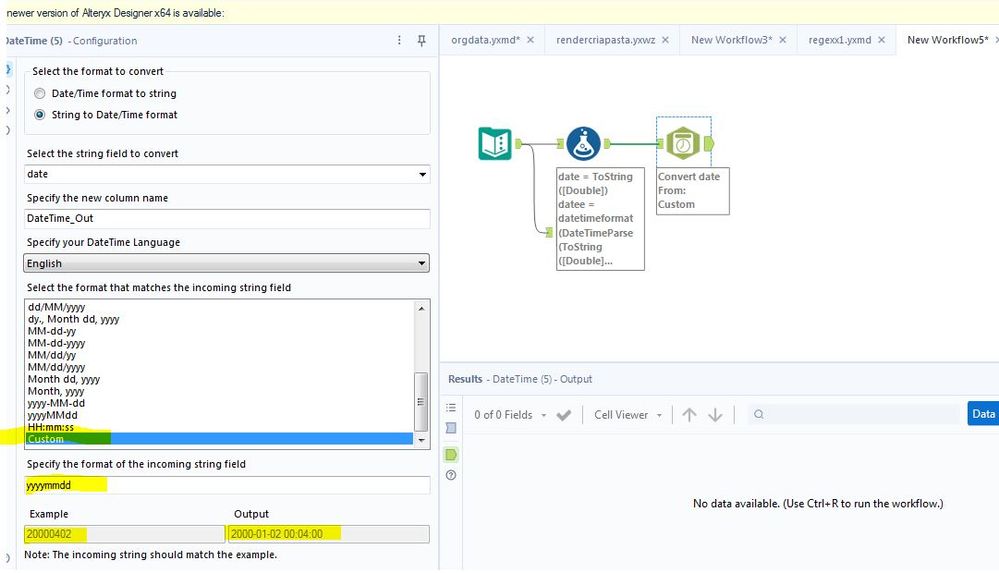
convert double date to string
date1 = ToString([DateExcel]
and then use the tool to convert to datetime with the custom option like print

datetime.JPG

Yoshiro_Fujimori
16 - Nebula
16 - Nebula

Hi @DanielShen ,


Another way is to use Formula tool as below.


Input & Output

InputOutput
2023072222/07/2023


Expression in Formula tool

DateTimeFormat(DateTimeParse(ToString([Input]),"%y%m%d"),"%d/%m/%Y")


DanielShen
Átomo

Hi all,


really appreciate your timley help. :)

Etiquetas
Autores con mayor cantidad de soluciones