In case you missed the announcement: The Alteryx One Fall Release is here! Learn more about the new features and capabilities here
ACT NOW: The Alteryx team will be retiring support for Community account recovery and Community email-change requests after December 31, 2025. Set up your security questions now so you can recover your account anytime, just log out and back in to get started. Learn more here
Start Free Trial

Alteryx Designer Desktop Discussions

Find answers, ask questions, and share expertise about Alteryx Designer Desktop and Intelligence Suite.
SOLVED

multi row formula - how to use

Bart_Esz
6 - Meteoroid

Dear All, 


I'm new in Alteryx. I'm trying to replicate following excel IF statement into Alteryx, however still cant succeed.

It is about adding new ID if the value in TEXT column differs from the upper one.

I was trying to use the Multirow formula tool but couldn't succeed.


Could someone help me, please.


thanks
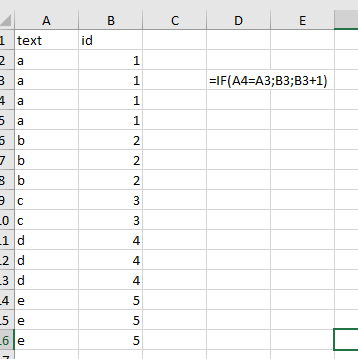
 

Bart_Esz_0-1629377069268.png


4 REPLIES 4
Emil_Kos
17 - Castor
17 - Castor

Hi @Bart_Esz,


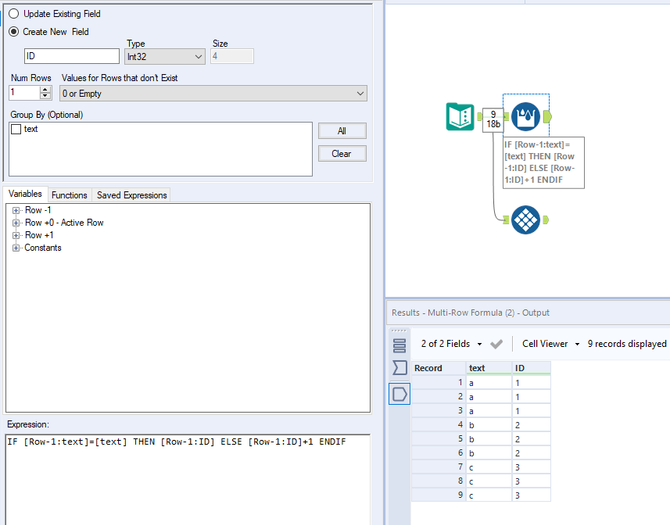
I have prepared multi row formula for you:


Emil_Kos_0-1629377449990.png

The output:


Emil_Kos_1-1629377458633.png


atcodedog05
22 - Nova
22 - Nova

Hi @Bart_Esz 


I am guessing you are trying to create the ID column. You can configure like below.


Workflow:

atcodedog05_0-1629377720892.png


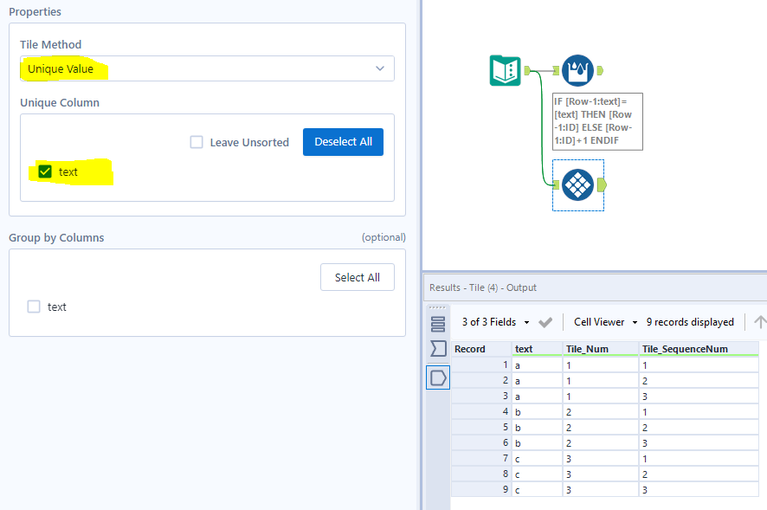
You can also use tile tool setting config to unique value and setting unique value to text.

atcodedog05_0-1629377806014.png


Hope this helps : )

Bart_Esz
6 - Meteoroid


atcodedog05
22 - Nova
22 - Nova

Happy to help : ) @Bart_Esz 

Cheers and have a nice day!

Labels
Top Solution Authors