Hi,
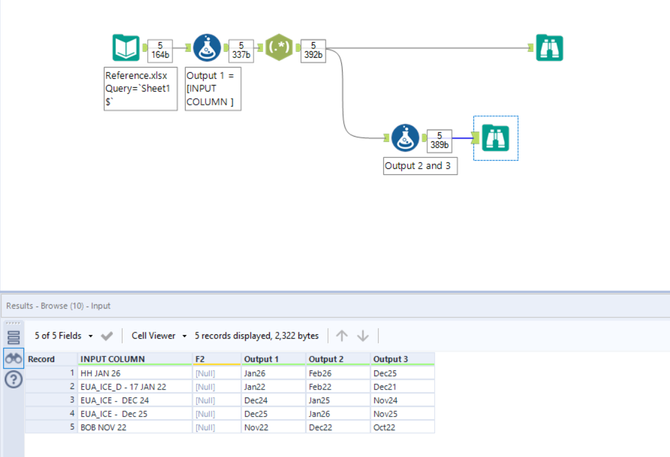
can anyone please help me extract and convert this data. I'm attaching input file in xlsx format and photo desired output. I would like to have 3 outputs like this in V_String or VW_String data type. Thank you.
@srk0609 Ah, of couse you are!
See attached.
Hey @srk0609, is Jan26 the same as year 2026 Jan or is it the 26th day of Jan?
Where does the data for Outputs 2 and 3 come from?
Here's a solution to Output 1,
What about something like this:
You could use the regular expression .*([[:alpha:]]{3}\s.*) to pull the month and date from the string. Not quite sure how you are getting the values from column 2 and 3, but if you are just looking to pull the dates from the string based on the pattern I think that this should suffice.
Here's a one tool solution,
I was looking at creating a one tool regex solution. Can you explain \L\u @PhilipMannering ? It doesnt seem to be a thing in regex101: build, test, and debug regex
I'm adding 1 month and Subtracting 1 month to input field. Could you please help me get output 2 and output 3?
@IraWatt I don't think I've ever used this before, but it appears that you can modify the case when doing a replace. So...
\L$1 will lower case group 1
\l$1 will lower case the first letter of group 1
\U$1 will uppercase group 1
\u$1 will uppercase the first letter of group 1
Therefore,
\L\u$1 will lower case everything and then uppercase the first letter = titlecase.
Pretty neat, right?
@PhilipMannering thanks for the explanation, it is very neat 😄
Hi @srk0609,
You can find a test attached with the exact desired output.
Let us know if it works as you want.
Cheers,
Thank you so much, Philip for your help. I just need one more small help from the same INPUT file, could you help me extract this?
Hi @srk0609 You can just use the Text to Columns tool and split on a space to get that! Let me know if you run into any difficulties and @IraWatt will help you out.
Hey @srk0609,
Exactly, for that all you need is the text to columns tool and put a space as the delimiter, see below:
HTH,
Ira